❌

Normale Ansicht

iFixit Says Apple's HomeView is Unnecessarily Hard to Repair

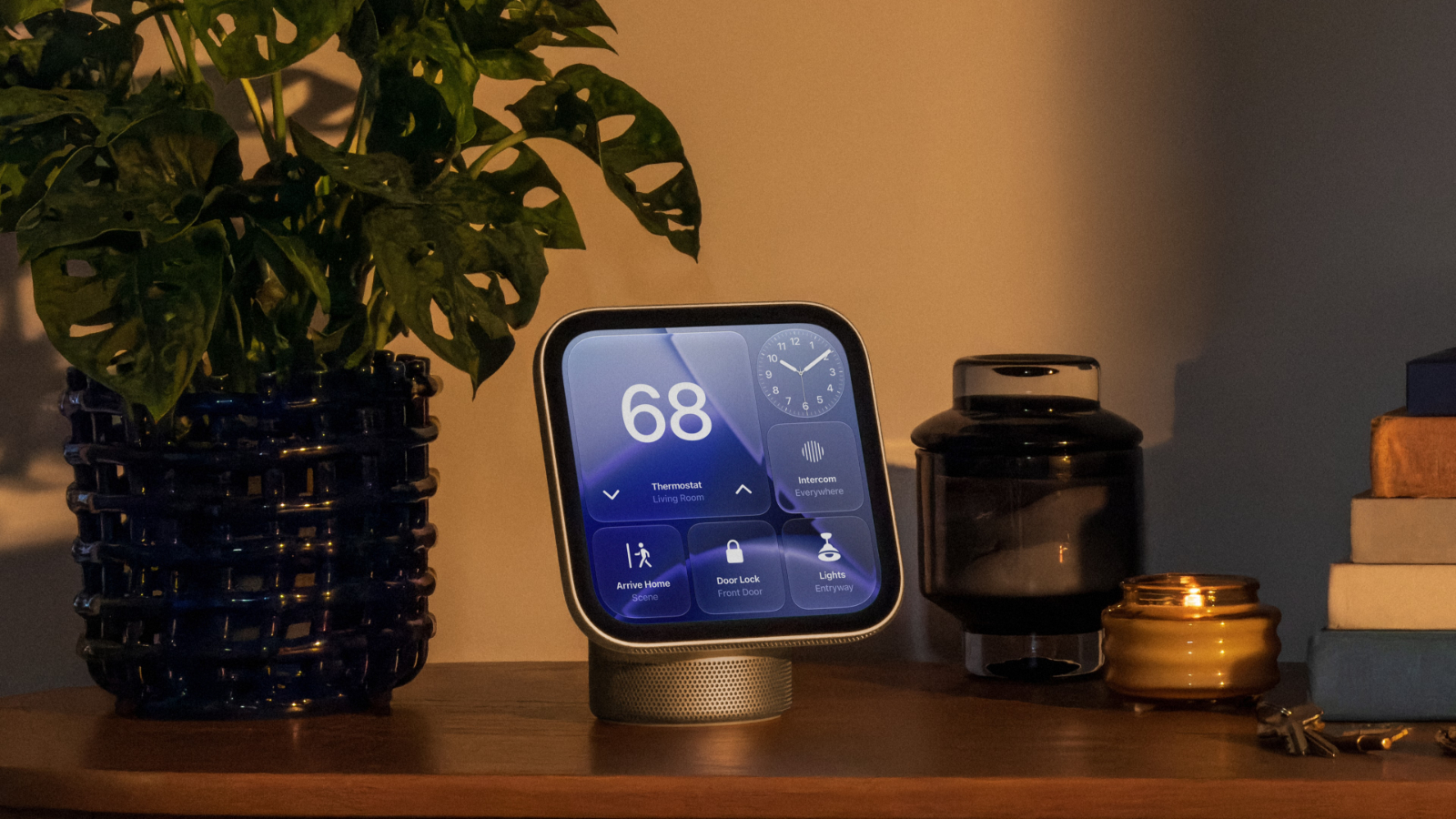
iFixit today tore down the Apple HomeView to see what's inside, and found that the device takes a step backward in repairability compared to the HomePod. Getting into it resulted in damage to internal components.


Strong adhesive holds the HomeView's display in place, and iFixit said it was difficult to remove. There's a mix of Phillips and Torx screws in different sizes securing internal components, necessitating several tools.

Speakers take up most of the internal space behind the display, with the logic board located behind them. The logic board has a shield that connects to the back of the aluminum enclosure, turning the entire thing into a heat sink to improve thermal performance. The thermal paste and adhesive attaching the shield to the casing made the logic board difficult to remove.

The speakers are held in place with a thick adhesive pad, and attempting to remove one caused it to snap in half. There are multiple cables connecting the display to the speaker base, and iFixit found the components of the wall-mounted and tabletop versions of the HomeView aren't interchangeable. The devices have different internal designs, with the wall-mounted version using a larger logic board and the tabletop model adopting larger speakers and a pivot mount.

The HomeView speaker base is designed similarly to a ‌HomePod‌, and iFixit found it easier to take apart. The USB-C port on the base is modular and can be replaced, as can the two passive speakers inside the enclosure. Because of how the HomeView is assembled, it isn't possible to separate the display from the base without going through the display side.

iFixit said Apple made several design choices that "made repairs unreasonably and unnecessarily difficult" with little thought for repair options.
Related Roundup: Apple HomeView
Tag: iFixit
Buyer's Guide: HomeView (Buy Now)

This article, "iFixit Says Apple's HomeView is Unnecessarily Hard to Repair" first appeared on MacRumors.com

Discuss this article in our forums
  •  

Final Cut Pro Now Includes MotionVFX for Creator Studio Users

Apple today updated Final Cut Pro (FCP), adding MotionVFX integration. Apple purchased the company earlier this year, so now the MotionVFX library is part of FCP. It includes the templates, titles, themes, effects, layouts, and transitions that are popular with creators.


MotionVFX graphics and effects can be dropped into a video timeline, and 3D titles and graphics can be added to a scene on moving surfaces or at a natural depth that matches camera movement. Masking improvements make it quicker to add outlines, accents, motion trails, and more to video subjects, and static photos and illustrations can be turned into animations.

There's a new Content Hub with access to stock video, photos, graphics, and backgrounds. Creators can also generate images in FCP with text descriptions, and then edit those images. Any image from an FCP project can be opened in Pixelmator Pro for editing, and then added back to FCP when editing is finished.

Apple added easing options for more precise control over animation, and there's a new timeline command for detaching a clip from the primary storyline to reposition it freely without affecting B-roll, titles, and audio.

The new features are included in the Creator Studio version of Final Cut Pro, so you will need a Creator Studio subscription to use them. Creator Studio is priced at $12.99 per month and includes access to Final Cut Pro, Logic Pro, Pixelmator Pro, Motion, Compressor, and special features in free apps like Pages, Keynote, and Numbers.

The one-time purchase version of Final Cut Pro does not include the new additions.

Update: Apple's outage today has delayed the release of the Final Cut Pro update, but it should be out shortly.
This article, "Final Cut Pro Now Includes MotionVFX for Creator Studio Users" first appeared on MacRumors.com

Discuss this article in our forums
  •  

Apple Blames Internal Update for Outage, Says It Wasn't a Cyberattack

Apple has largely resolved outages affecting iCloud accounts, retail stores, and more, the company said in a statement to Bloomberg. Apple said the outages were due to an unspecified "internal update" and were not caused by a cyberattack. The company is working to get remaining systems online "as soon as possible."


Issues started around 11:45 a.m. ET, with social media reports suggesting users were unable to access their Apple Accounts or sign in to services. Apple retail store systems were also offline, and customers in stores were not able to complete purchases.

The System Status page is still listing issues with ‌iCloud‌ Accounts and Sign In, AppleCare on Device, Apple Business, Apple School Manager, Schoolwork, ‌iCloud‌ Mail, and ‌iCloud‌ Web Apps. Services are listed as slow or unavailable.

The Apple outage follows other major outages over the last few days that caused an FAA nationwide ground stop and impacted Microsoft 365 services worldwide.
This article, "Apple Blames Internal Update for Outage, Says It Wasn't a Cyberattack" first appeared on MacRumors.com

Discuss this article in our forums
  •  

Google Wallet Available on iPhone, But Without Tap to Pay

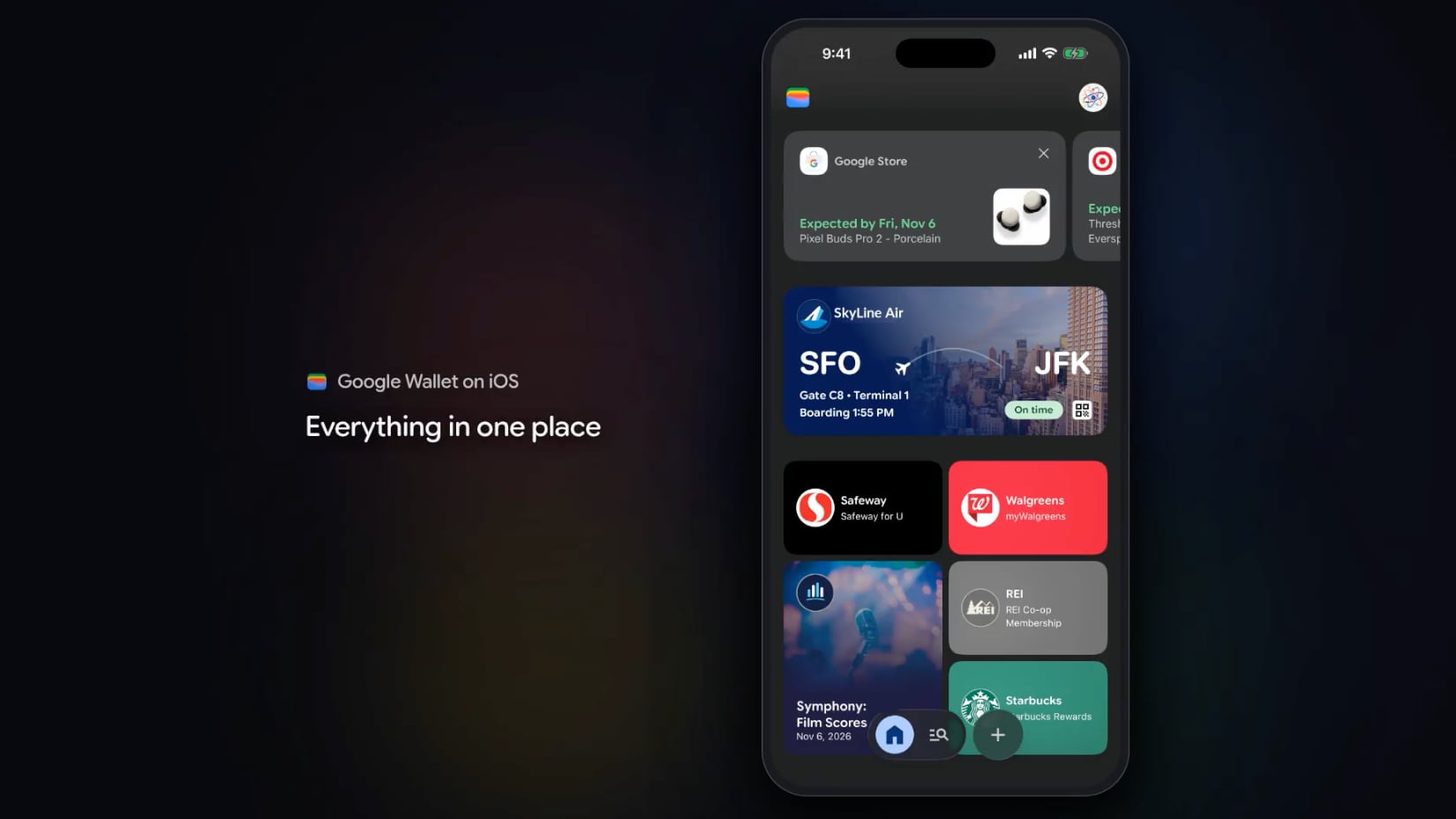
Google today said it is bringing Google Wallet to iOS in the United States, giving users a way to make payments and manage purchases across Google services.


Google Wallet cannot be used for tap-to-pay purchases in retail locations, but it otherwise serves as an alternative to Apple Wallet. It can store payment cards for online checkout with Google Pay, and it syncs with Gmail and other Google apps for features like package tracking and storing tickets and boarding passes.

As with Apple Wallet, Google Wallet lets users add loyalty and gym membership cards, so there's no need to use a physical card. Google says users can manage "agentic purchases made across Google," with easy access to order confirmations, receipts, and delivery updates.

Apple began allowing NFC contactless payments in third-party apps with iOS 18.1, but it requires a commercial agreement with Apple, so that may be why Google hasn't implemented support. Google could add contactless payments, but it would need to pay Apple's fees. NFC access is available to app developers in Australia, Brazil, Canada, Japan, New Zealand, the U.K., and the U.S.
This article, "Google Wallet Available on iPhone, But Without Tap to Pay" first appeared on MacRumors.com

Discuss this article in our forums
  •  

Apple Accounts, App Store and Apple Music Experiencing Issues

Apple Accounts and iCloud sign-ins appear to be experiencing issues, according to multiple social media reports and Apple's System Status page.


Apple says ‌iCloud‌ Account and Sign In may be slow or experiencing issues, but there are no other outages listed on the site.

There are also reports on social media about Apple retail stores and other services like Apple Music and Apple Pay experiencing issues. Anything related to an Apple Account seems to be malfunctioning, with users unable to sign in.

Update 1:10 p.m. ET: Apple's System Status page is listing outages for App Store, ‌Apple Music‌, and AppleCare on Device, along with the ‌iCloud‌ account issue.

The developer status page lists outages for Accounts, ‌App Store‌ Connect, the ‌Apple Music‌ API, ‌Apple Music‌ Connect, and Apple Podcasts Connect.
This article, "Apple Accounts, App Store and Apple Music Experiencing Issues" first appeared on MacRumors.com

Discuss this article in our forums
  •  

Everything New in iOS 27.3 Beta 2

Apple released the second beta of iOS 27.3 today, and like the first beta, it has several major new features. There are improvements to the iPhone Duo, tweaks to apps, new Siri features, and more.


iPhone Duo Face Unlock


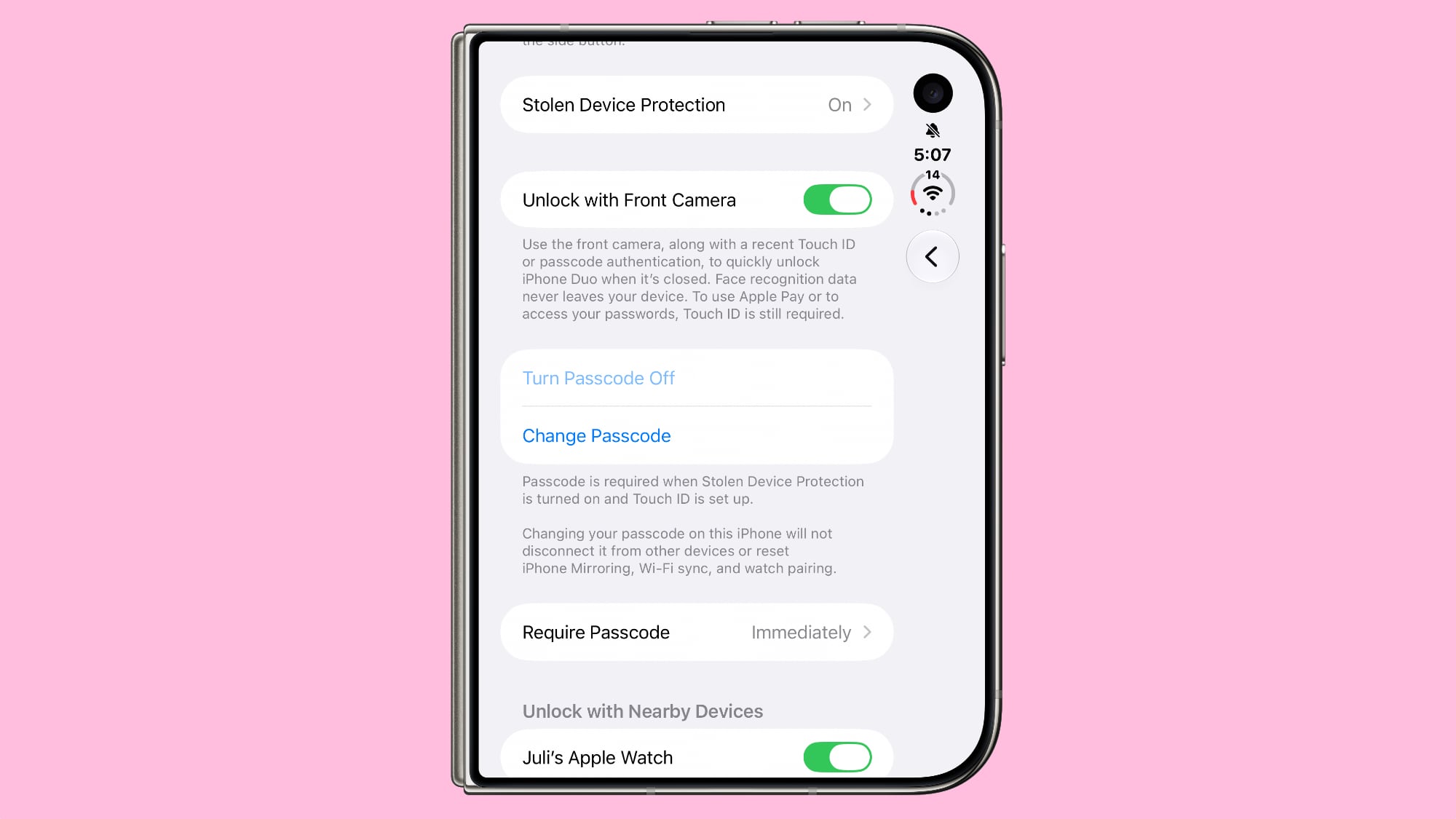
Apple added a new option to quickly unlock the iPhone Duo using the front-facing camera. The option is only available when the ‌iPhone Duo‌ is closed, and it can only be used on the Lock Screen.


Authenticating with Touch ID is required for Apple Pay purchases and for accessing passwords and logins. Unlocking with the camera requires recent ‌Touch ID‌ or passcode authentication, and ‌Touch ID‌ is required again after about 45 minutes of inactivity.

Unlocking with the front-facing camera does not work when the ‌iPhone Duo‌ is open, presumably because the under-display camera is not high enough quality. The face unlock feature can be turned on in the Settings app under ‌Touch ID‌ and Passcode.

iPhone Duo Lock When Closed


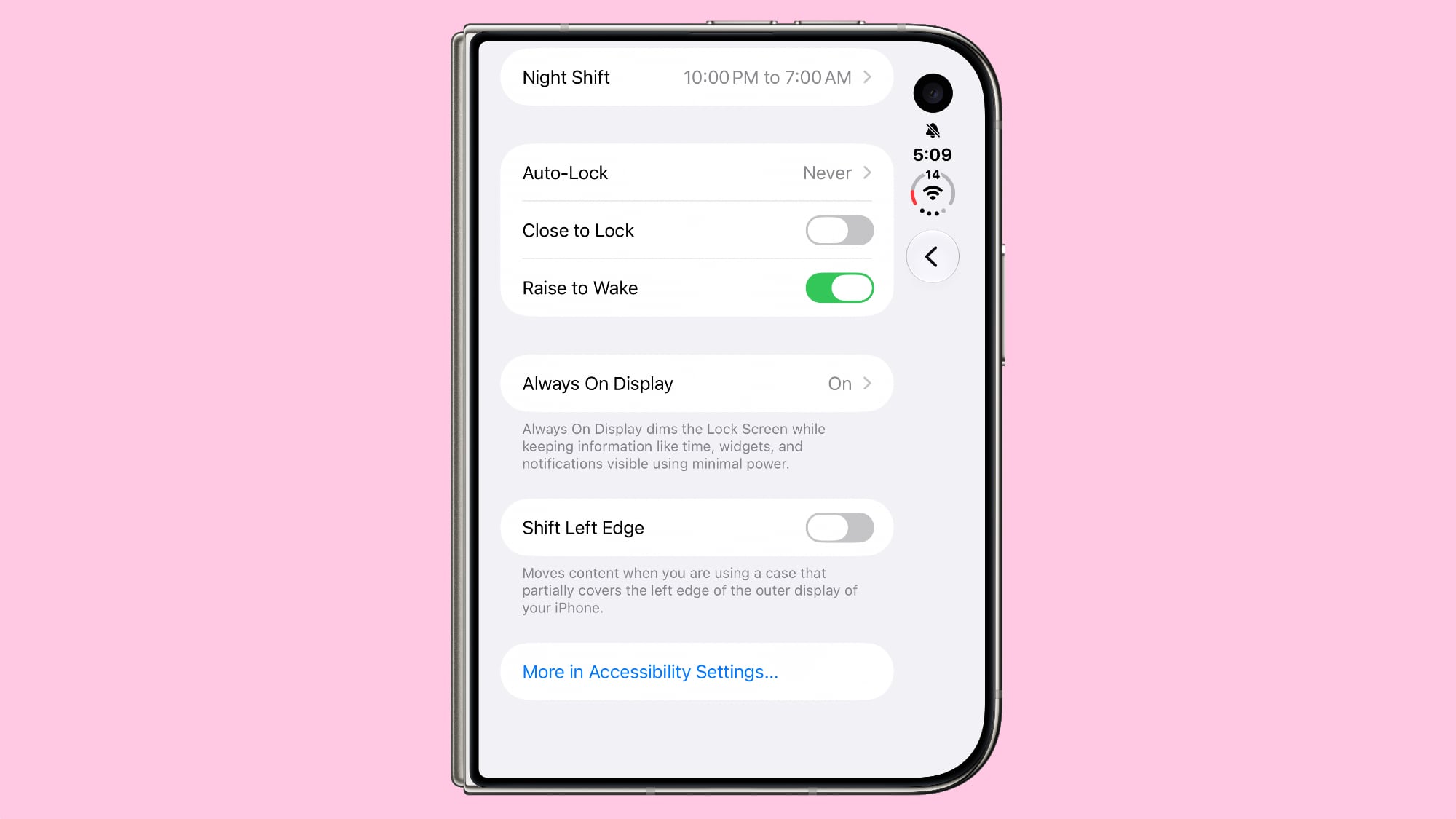
Apple added an option to lock the ‌iPhone Duo‌ when it's closed instead of transferring content to the front display.


Close to Lock can be turned on in the Display and Brightness section of the Settings app.

Siri AI


There's a new "Ask About Page" feature for ‌Siri‌ AI that lets ‌Siri‌ see the entire content of a webpage, even if it's not currently in view on the screen.

‌Siri‌ AI can also now access Health data when given permission, and control over smart home products has improved.

Apple Intelligence and Siri AI Usage Limits


iOS 27.3 introduces the Apple Intelligence usage limits cxdApple has been warning about for months. ‌Siri‌ AI and ‌Apple Intelligence‌ features that use server-side processing will now have daily usage limits on a per-device basis.

Extra access is tied to 200GB and higher iCloud+ plans. The 200GB plan gives up to 2x usage, the 2TB plan is up to 5x, the 6TB plan is up to 10x, and the 12TB plan is up to 20x.

Limits apply to complex ‌Siri‌ AI requests that involve multiple steps, image generation and editing tools, AI workflows and automations in Shortcuts, and third-party apps that use Apple Foundation Models in Private Cloud Compute. More information can be found in our article on the new limits.

Calendar


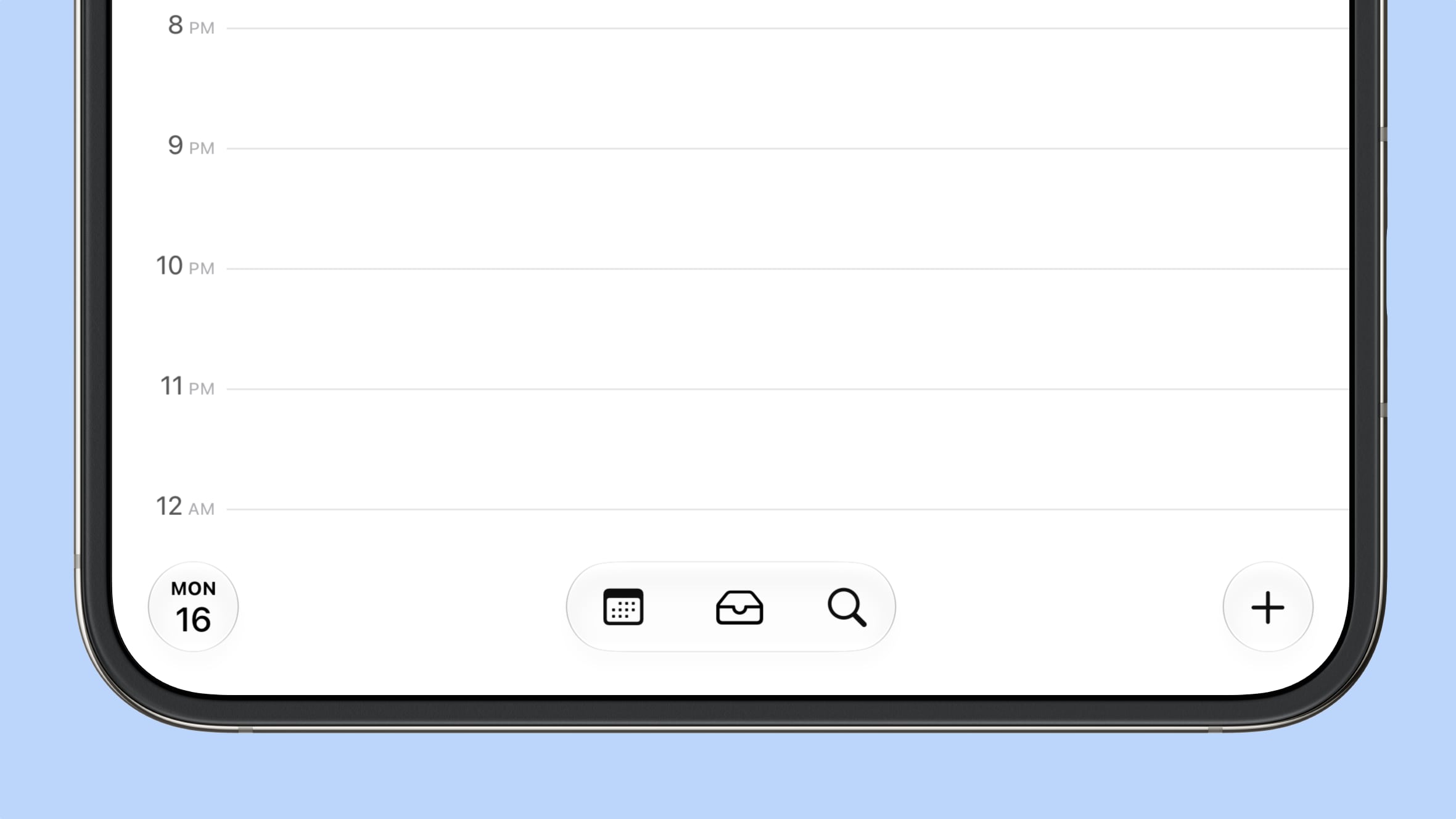
The Calendar app has an updated layout with the options for searching and adding an event moved to the bottom of the app. The "Today" button that takes you to the current date has also been updated to show the date.


Apple TV App Podcasts


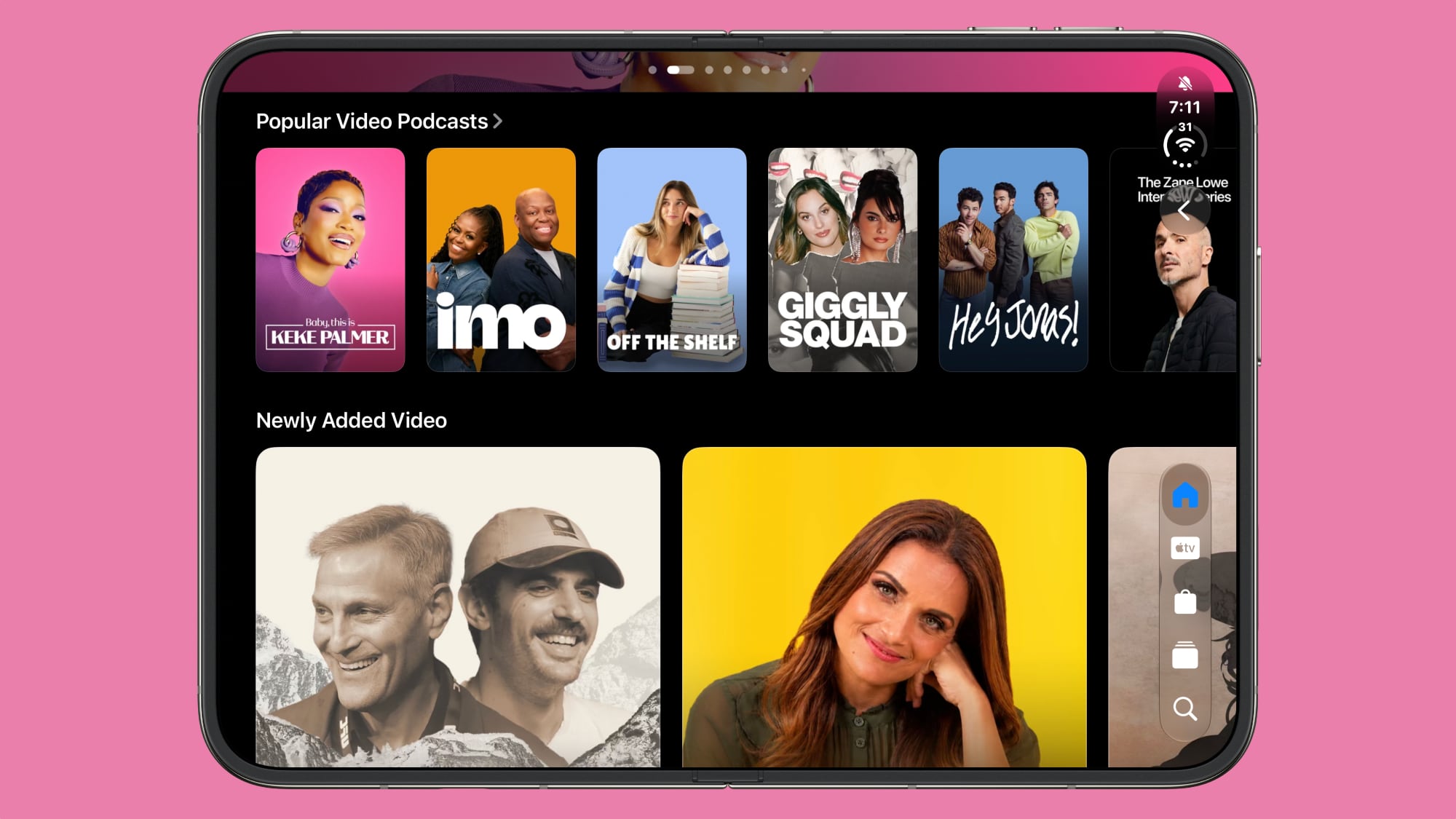
Video podcast episodes are now available in the Apple TV app. Only video podcasts that are free will show up in the ‌Apple TV‌ app.


Apple News+ Puzzles


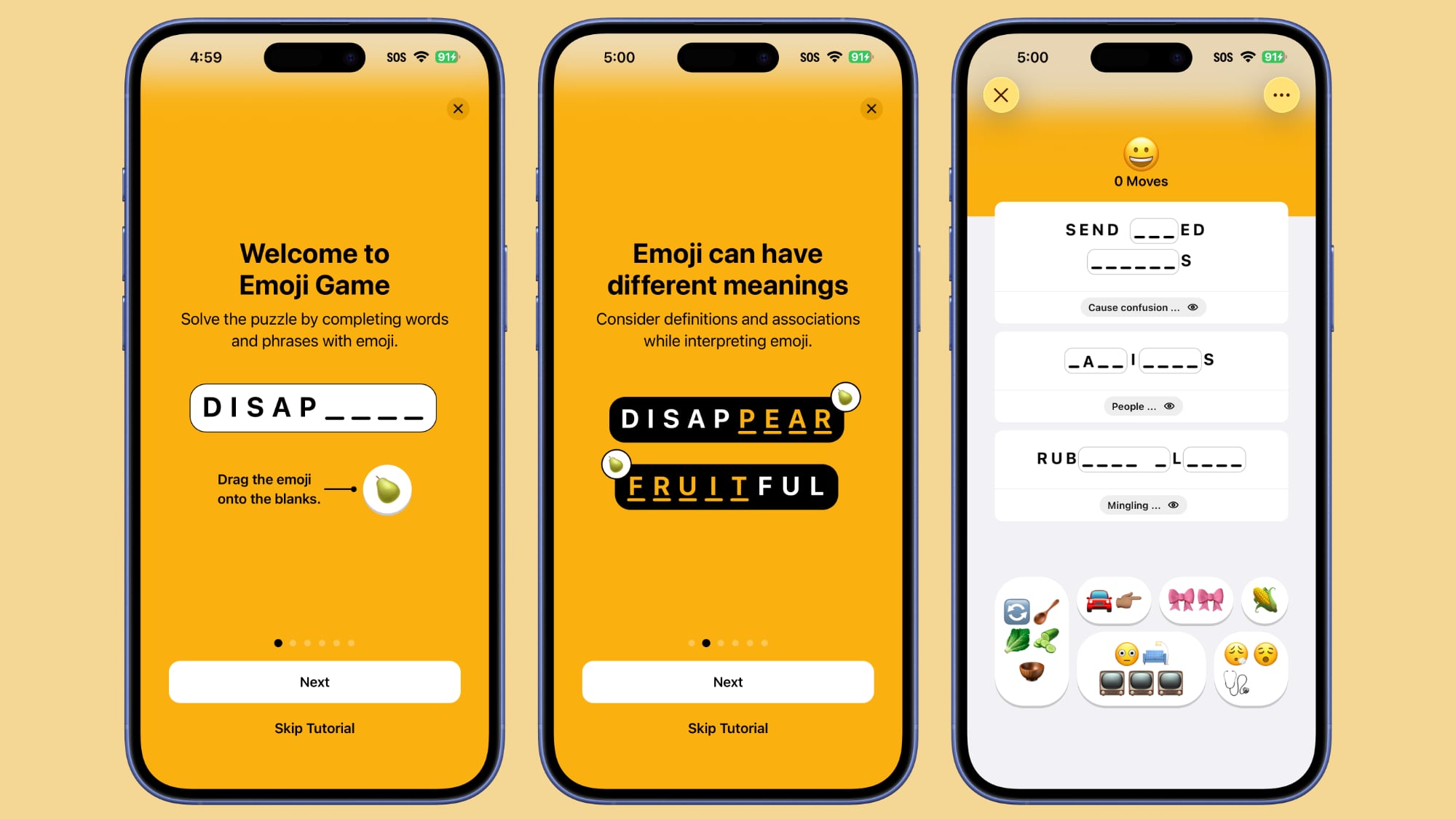
Apple News+ Puzzles are expanding to Australian, UK, and French-Canadian ‌Apple News‌+ subscribers.

Subscribers in Australia get access to a daily quick crossword, crossword mini, Sudoku, Quartiles, and Emoji Game. UK subscribers get the daily quick crossword, crossword mini, and Sudoku, while French-Canadian subscribers can play Quartiles and Emoji Game.

Weather App


There are 10 new weather condition symbols in the Weather app, but Apple doesn't appear to be using them yet.

The Weather app gets 10 new weather-condition symbols in iOS 27.3 beta 2. https://t.co/1c5W4n5gKn

— pdfu (@itspdfu) November 16, 2026


Home App


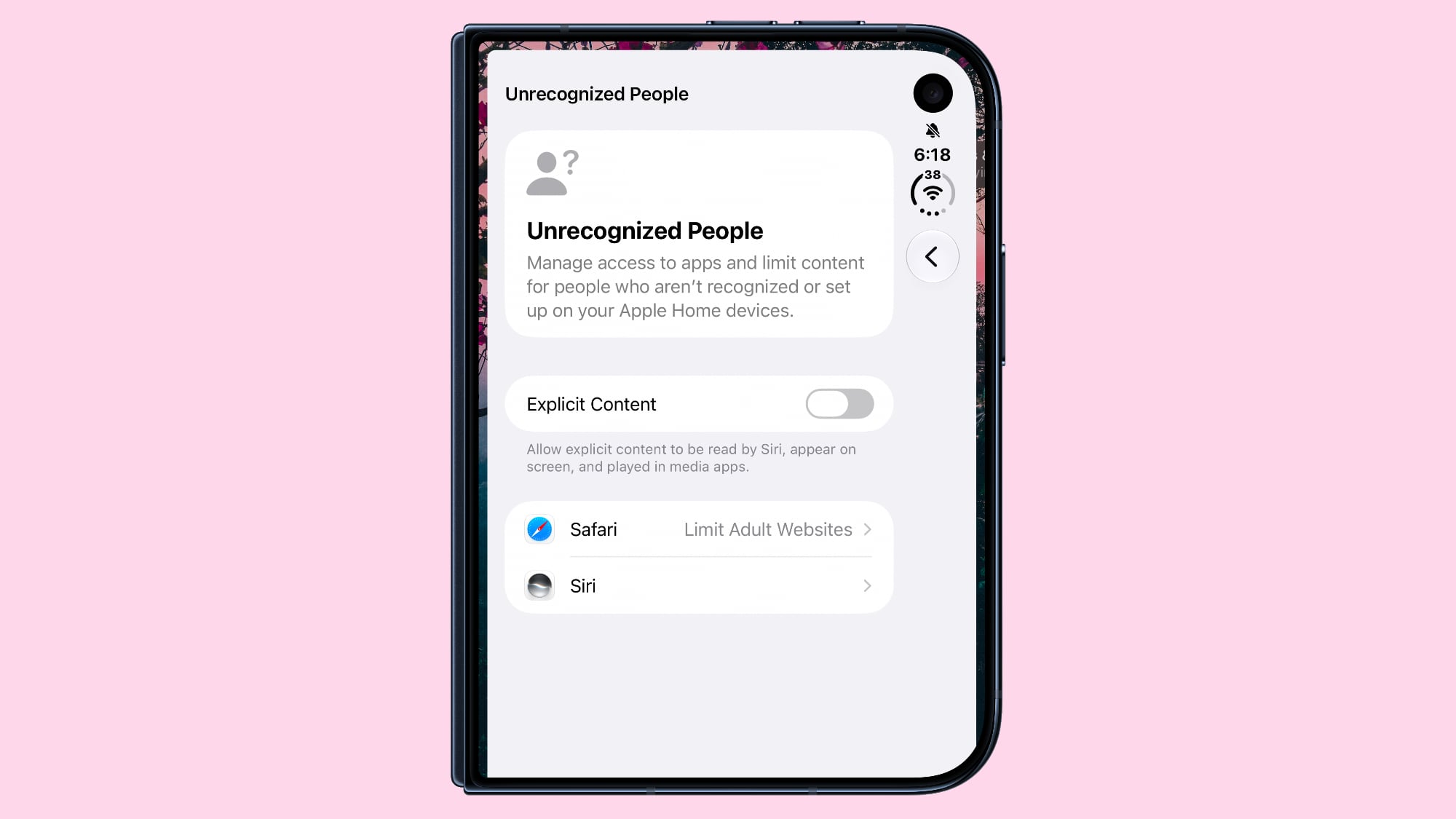
The Home app has an "Unrecognized People" section that limits how guests can use Safari and ‌Siri‌ on Apple home devices.


Apple Music


There's code in Apple Music for an album release countdown, but it doesn't appear to be active yet.
Related Roundups: iOS 27, iPadOS 27
Related Forum: iOS 27

This article, "Everything New in iOS 27.3 Beta 2" first appeared on MacRumors.com

Discuss this article in our forums
  •  

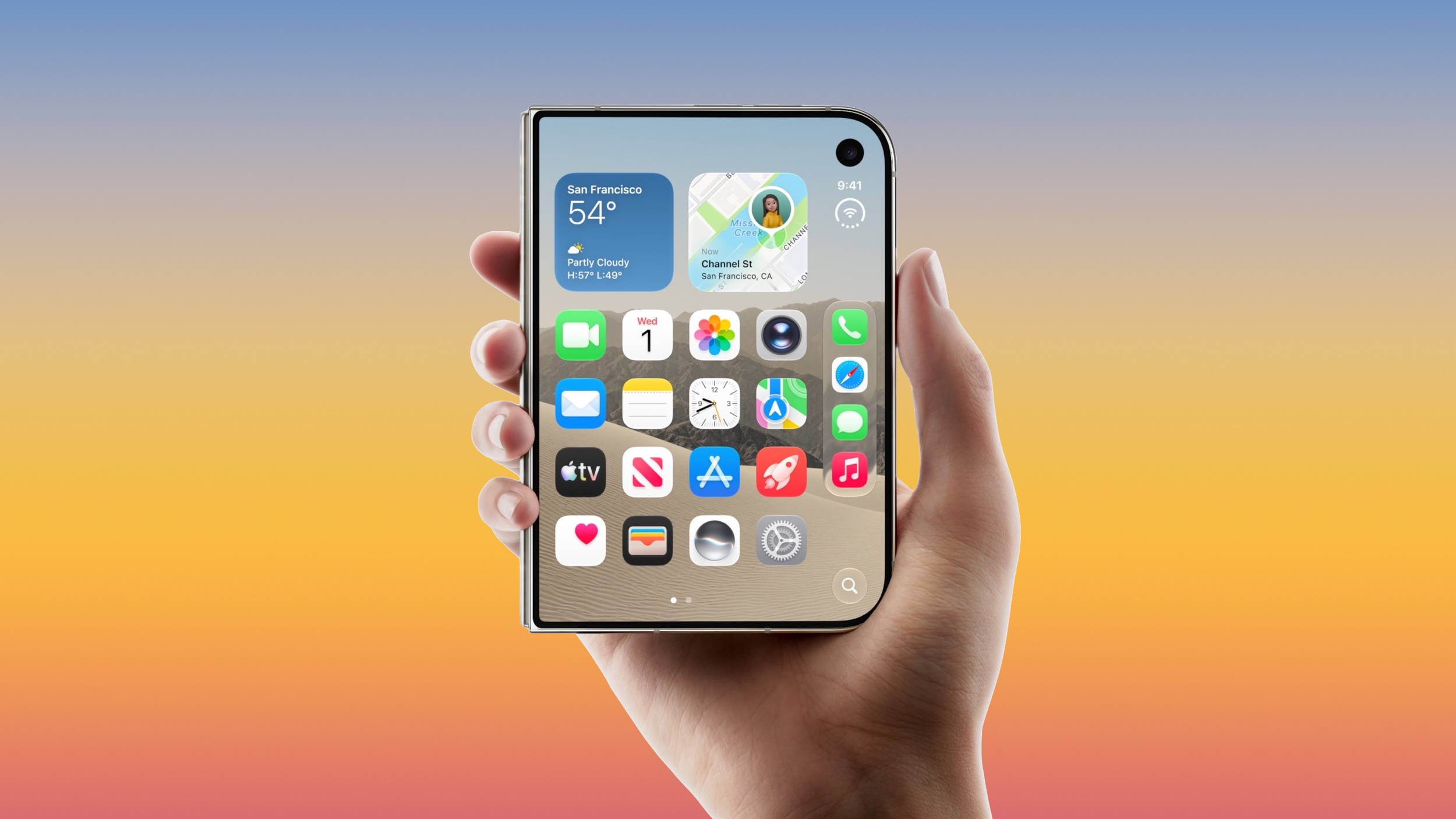
iPhone Duo Orders Will Now Arrive Before the Holidays

Supplies of the iPhone Duo are improving, and many people will be able to get Apple's foldable before the holidays. New ‌iPhone Duo‌ orders placed today in the U.S. will arrive between December 16 and December 23, up from the prior January 25 delivery estimate.


The December timing is available for all ‌iPhone Duo‌ colors and capacities. ‌iPhone Duo‌ orders were still listing a delivery date in January last Thursday, so the change was made in the last few days.

Apple has been steadily improving iPhone Duo delivery dates for people who pre-ordered, and with new order dates moved up, all pre-orders should also arrive in December or earlier.

We've heard reports from several users who originally had January delivery dates. Those orders have been moved to December 14 to December 21 in most cases, and some even earlier.

During Apple's fourth-quarter earnings call, CEO John Ternus said Apple was working hard to get the Duo to as many customers as quickly as possible, but he had no timeline for when the company expected to reach supply/demand balance.
Related Roundup: iPhone Duo
Buyer's Guide: iPhone Duo (Buy Now)
Related Forum: iPhone

This article, "iPhone Duo Orders Will Now Arrive Before the Holidays" first appeared on MacRumors.com

Discuss this article in our forums
  •  

Hands-On With the iPhone Duo's New Face Unlock

With iOS 27.3 beta 2, Apple is partially solving a common iPhone Duo complaint. There's a new feature for unlocking the device with the front camera, which we've tested out.


Unlock with Front Camera is a new option in iOS 27.3. If you turn it on, you can quickly unlock the ‌iPhone Duo‌ when it's closed.

It's a feature that only works at the Lock Screen when the Duo is closed, so you can't use it for authenticating Apple Pay purchases or inserting logins and passwords from the Passwords app. You also need to use Touch ID or a passcode for unlocking the ‌iPhone Duo‌ when it's unfolded.

Face unlock can be turned on in the ‌Touch ID‌ & Passcode section of the Settings app, and it works fairly well when it's active. You aren't going to have much luck in a dark room because it's just using the standard front camera, but if the lighting is decent, you can unlock without ‌Touch ID‌.

Apple also added a "Close to Lock" feature that locks the ‌iPhone Duo‌ when you close it instead of transferring content to the outer display.

These features are in the latest developer beta and will be available to everyone when iOS 27.3 is released in December.
Related Roundups: iOS 27, iPadOS 27, iPhone Duo
Buyer's Guide: iPhone Duo (Buy Now)
Related Forums: iOS 27, iPhone

This article, "Hands-On With the iPhone Duo's New Face Unlock" first appeared on MacRumors.com

Discuss this article in our forums
  •  

macOS 27.3 Warns Against Giving AI Apps Full Mac Control

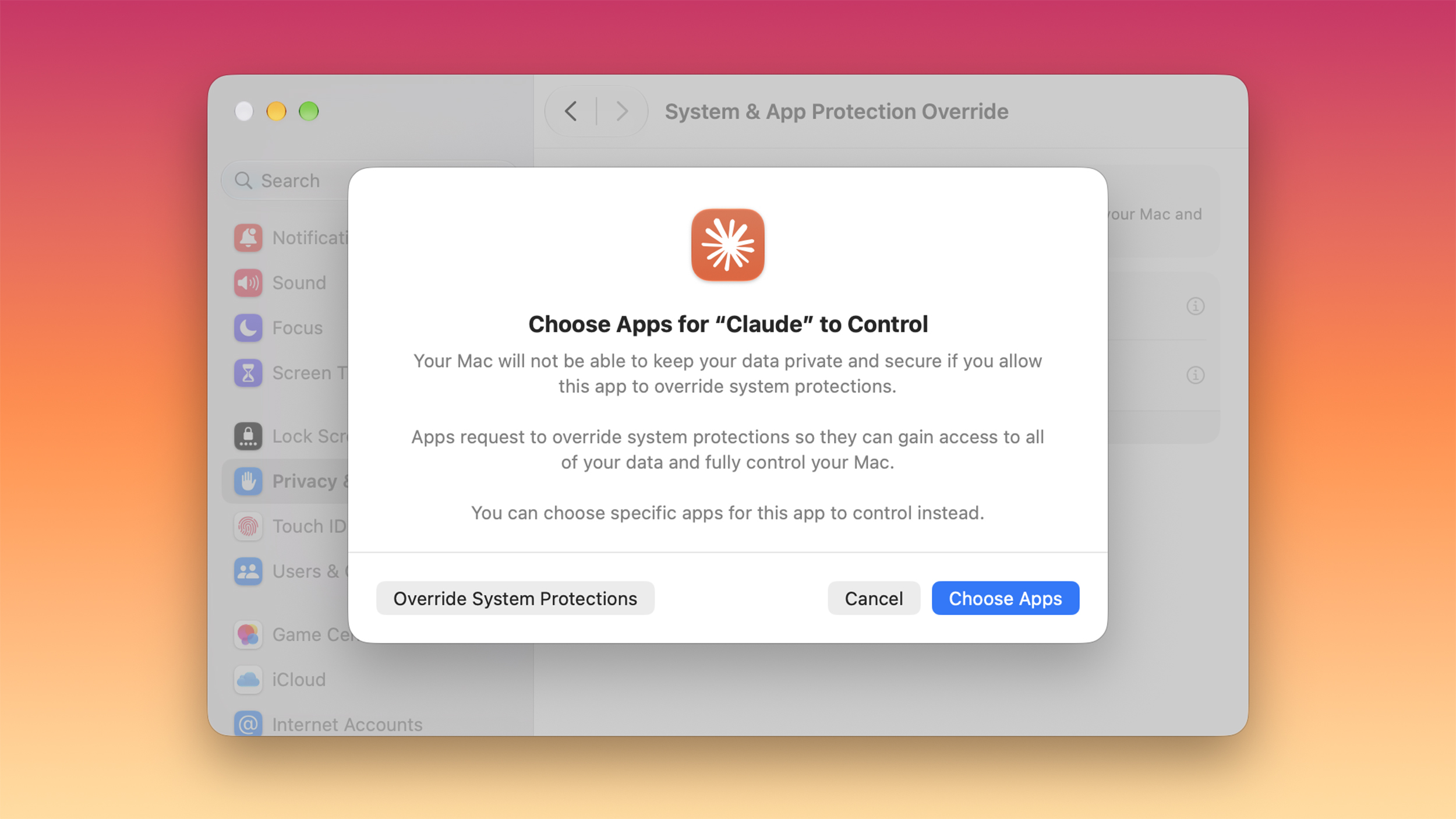
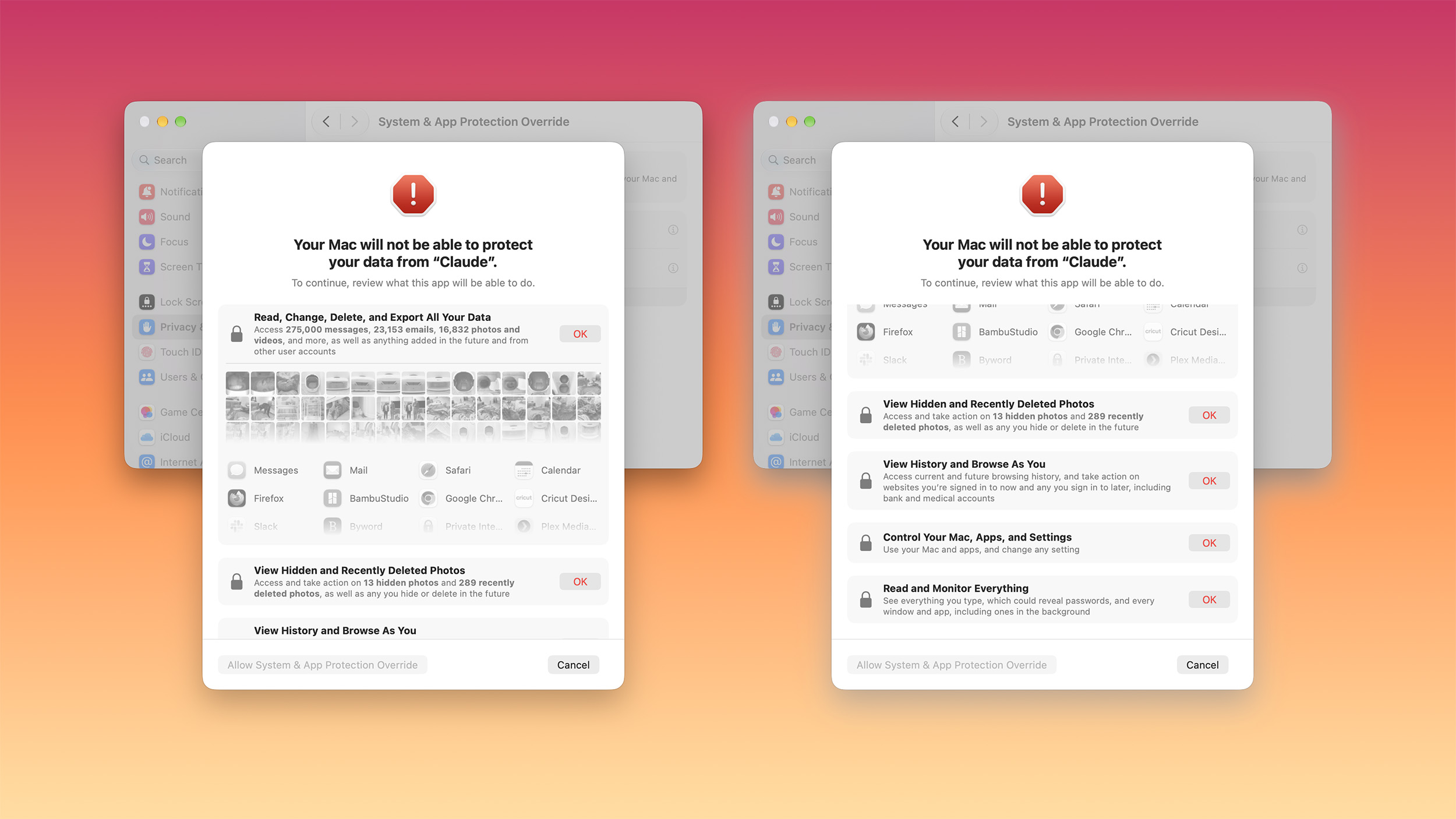
With the latest macOS 27.3 beta, Apple is giving Mac users more control over the data they share and the access they give to apps, including apps that use AI agents. Apple today informed developers about upcoming changes to the Full Disk Access API and the Device Control and Data Access API.


Here's what Apple says is changing:

  • The current Device Control and Data Access setting will be split into two options that make it clearer to users what they're permitting. The setting is becoming System & App Protection Override and Accessibility.

  • There will be a single method for granting permissions by selecting the app requesting access from a list.

  • Apple will encourage users to grant access to just the specific apps (in System & App Protection Override) or folders (for Full Disk Access) required for workflows.

  • Apple will better inform users about the data apps will receive access to or control over if full permissions are given.

  • Users will have an option to configure apps to ask each time for required access rather than granting an app unrestricted access.

  • There will be a transparency indicator when a requesting app is controlling another app with System & App Protection Override. The indicator will be displayed in the Mac menu bar.


Apple says developers will need to adjust user onboarding and make sure apps can "gracefully handle" access to a limited set of folders or apps when using the APIs being overhauled.


Apps that use Full Disk Access for disk backup or the new Accessibility settings for assistive technologies can request entitlements to offer the same experience for new installations that they offered before macOS 27.3.

Right now, known apps keep their current experience without an entitlement, and app permissions granted by users prior to macOS 27.3 will remain in effect. Mac users will see these changes when approving new app permission requests, and entitlement details are coming soon.

Last month, Apple said it would add "additional controls" for Full Disk Access on Macs because of the risks posed by AI agents. Apple warned that some developers are using Full Disk Access in ways that can put users at risk, exposing files, mail, messages, browsing history, and more.
This article, "macOS 27.3 Warns Against Giving AI Apps Full Mac Control" first appeared on MacRumors.com

Discuss this article in our forums
  •  

iPad and Mac Get Apple Intelligence in China in 27.3 Betas

Today's iPadOS 27.3 and macOS 27.3 betas expand Apple Intelligence support in China to the iPad and the Mac.


‌Apple Intelligence‌ features debuted in China on the iPhone in the first iOS 27.3 beta, but they weren't initially available in iPadOS 27.3 or macOS 27.3. The Shanghai Cyberspace Administration said on November 9 that Apple had registered to bring ‌Apple Intelligence‌ to tablets and laptops.

Developers in China can test ‌Apple Intelligence‌ after updating to the second iPadOS 27.3 and macOS 27.3 betas. ‌Apple Intelligence‌ is available on Macs and iPads with an M-series Apple silicon chip, as well as the A17 Pro and A20 Pro ‌iPad‌ minis.

‌Apple Intelligence‌ in China does not include Siri AI, the ‌Siri‌ app, or the newer ‌Apple Intelligence‌ features in iOS 27, but it does include many of the features that debuted in the U.S. starting in iOS 18.1. ‌Siri‌, Writing Tools, and other features integrate with Alibaba's Qwen model, similar to the ChatGPT integration in other countries.

Here's what's live:

  • Live Translation for Messages, FaceTime, and the Phone app. Live Translation also works with AirPods 4 with ANC, AirPods Pro 2, and later models.

  • Writing Tools for rewriting, proofreading, and summarizing text. With Qwen integration, users can also generate text.

  • Visual Intelligence for identifying objects, places, and more.

  • Clean Up in Photos for removing unwanted objects from images.

  • Genmoji for creating custom emoji.

  • Natural language search and memory movie creation in ‌Photos‌.

  • Email summaries, suggested smart replies, and priority emails in the Mail app.

  • Notification summaries, urgent notifications, and the Reduce Interruptions Focus mode.

  • Summaries for audio recordings in the Notes app.

  • Call transcripts in the Phone app, which are saved to the Notes app.

  • Type to ‌Siri‌ and more natural ‌Siri‌ responses.

  • ‌Siri‌ can relay requests to Qwen to give more in-depth answers.


iOS 27.3, iPadOS 27.3, and macOS 27.3 will launch to the public in December.
Related Roundups: iOS 27, iPadOS 27
Related Forum: iOS 27

This article, "iPad and Mac Get Apple Intelligence in China in 27.3 Betas" first appeared on MacRumors.com

Discuss this article in our forums

  •  

Apple News+ Puzzles Come to UK, Australia, and French Canada

In iOS 27.3, iPadOS 27.3, and the other 27.3 updates, puzzles are expanding to Australian, UK, and French-Canadian Apple News+ subscribers.


‌Apple News‌+ subscribers in Australia get access to a daily quick crossword, crossword mini, Sudoku, Quartiles, and Emoji Game. UK subscribers get the daily quick crossword, crossword mini, and Sudoku, while French-Canadian subscribers can play Quartiles and Emoji Game.

Quartiles and Emoji Game are original Apple puzzles. Quartiles requires players to form words by combining letter tiles, and Emoji Game lets subscribers complete phrases using a selection of emoji.

Prior to now, ‌Apple News‌+ puzzles have been limited to the U.S. and English-language subscribers in Canada. The games can be accessed in the Puzzles section under the Following tab in the ‌Apple News‌ app in iOS 27.3 beta 2. The update will launch to the public in December.
This article, "Apple News+ Puzzles Come to UK, Australia, and French Canada" first appeared on MacRumors.com

Discuss this article in our forums
  •  

macOS Golden Gate 27.3 Beta 2 Now Available for Developers

Apple today seeded the second beta of macOS Golden Gate 27.3, with the software coming two weeks after the first beta.


Registered developers can download ‌macOS Golden Gate‌ 27.3 by opening up the System Settings app, clicking on General, selecting Software Update, and opting in to ‌macOS Golden Gate‌ betas.

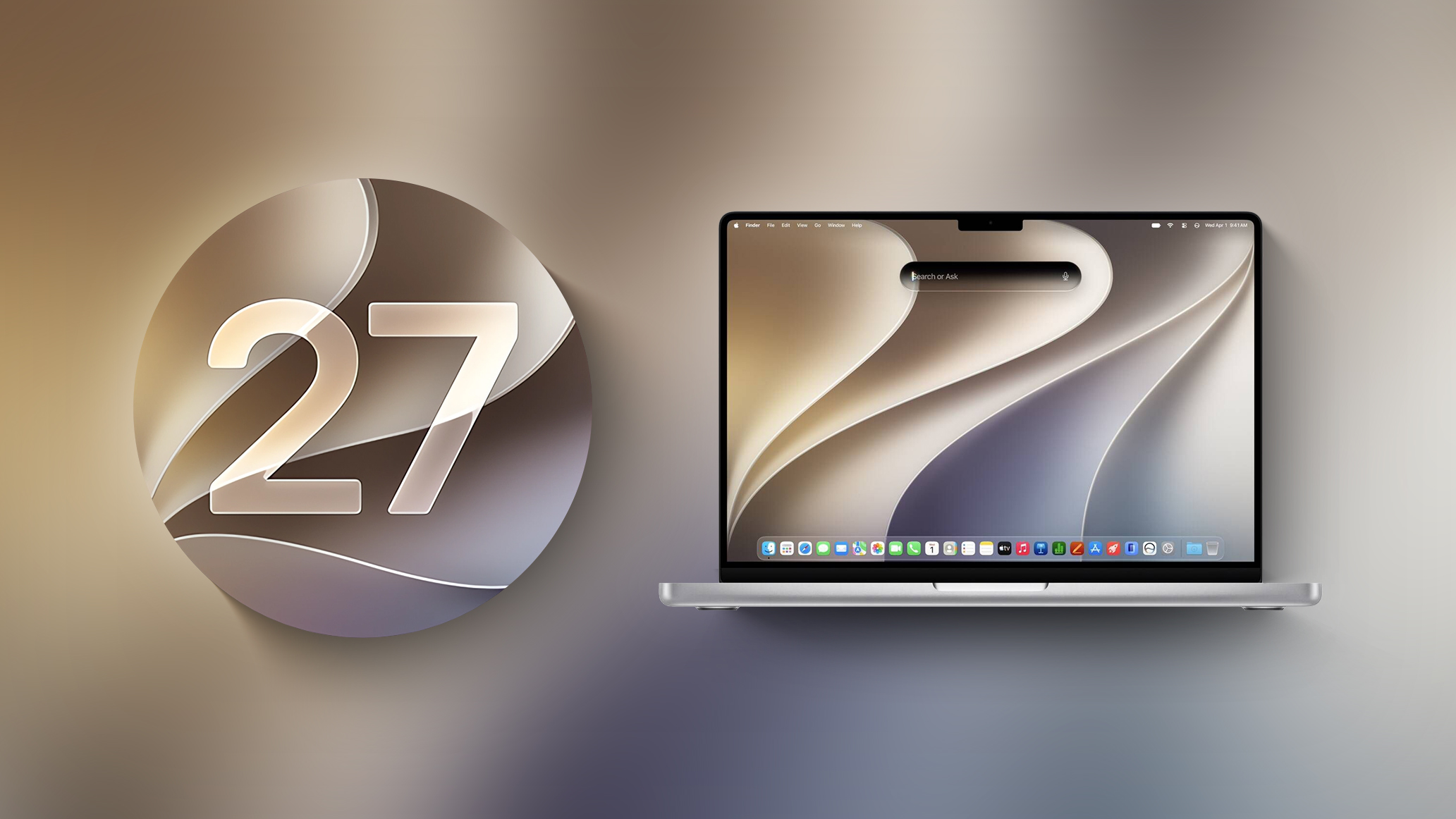
macOS 27.3 includes Vertical Tabs and an Adaptive Dark Mode for Safari, along with a more capable version of Siri AI that can complete more actions in Apple's own apps.

Native Live Activities are available on the new PROLED MacBook Pro as well as Macs without a Dynamic Island. macOS 27.3 also adds a security fix to prevent command-line tools from accepting compromised web certificates.
Related Roundup: macOS Golden Gate
Related Forum: macOS Golden Gate

This article, "macOS Golden Gate 27.3 Beta 2 Now Available for Developers" first appeared on MacRumors.com

Discuss this article in our forums
  •  

Apple TV App Gets Video Podcasts in iOS 27.3

Video podcast episodes from the Podcasts app are coming to the Apple TV app in iOS 27.3, iPadOS 27.3, and the other 27.3 software updates.


‌Apple TV‌ app users will be able to discover and watch their favorite podcasts on the iPhone, iPad, Mac, ‌Apple TV‌ 4K, supported smart TV sets, set-top boxes with the ‌Apple TV‌ app, and CarPlay-enabled vehicles. Podcasts will be free to watch, with no ‌Apple TV‌+ subscription required. Podcasts that require a paid subscription will not be included in the ‌Apple TV‌ app.

Developers can access podcast video episodes in ‌Apple TV‌ with the second developer beta of iOS 27.3 that was released today.
Related Roundups: Apple TV, iOS 27, iPadOS 27
Buyer's Guide: Apple TV (Buy Now)

This article, "Apple TV App Gets Video Podcasts in iOS 27.3" first appeared on MacRumors.com

Discuss this article in our forums
  •  

iOS 27.3 Beta Adds Daily Siri AI Limits and iCloud+ Upgrades

With the latest iOS 27.3, iPadOS 27.3, and macOS 27.3 betas, Apple is starting to test limits and paid upgrades for Siri AI and Apple Intelligence features.


Every Apple device gets a free daily access allowance for Siri AI and ‌Apple Intelligence‌ features that rely on server-side AI processing, such as Image Playground and Clean Up in Photos. When that limit is hit, there will be an option to extend usage with an iCloud+ plan. Here's what will be limited after the daily allowance has been reached:


  1. ‌Siri‌ AI for multi-step, personal context requests that rely on server-side processing, such as asking ‌Siri‌ what time you need to leave from home to make it to a location on time.

  2. Image generation and editing tools, including ‌Image Playground‌ and the AI options in ‌Photos‌ like Clean Up, Extend, and Spatial Reframing.

  3. Workflows and automations in Shortcuts that rely on AFM Cloud and AFM Cloud Pro.

  4. Third-party apps that use Apple Foundation Models in Private Cloud Compute for AI features.


While more complex, multi-step requests will be restricted, basic ‌Siri‌ commands will continue to be available even after a device limit is reached. Examples of basic ‌Siri‌ commands include those with a single ask, such as "set a timer for 30 minutes" or "text Eric I'm on my way."

Apple's existing ‌iCloud‌+ plans will include higher daily usage for ‌Siri‌ AI and ‌Apple Intelligence‌, with no change in pricing. If you already subscribe to an eligible ‌iCloud‌+ plan, you will have higher usage limits. Free limits are per device, not per account, and do not roll over.

More access starts with the 200GB ‌iCloud‌+ plan, which is priced at $2.99 per month. Users who subscribe to this plan have up to a 2x usage limit. Users who subscribe to the $9.99/month 2TB plan get up to 5x usage. The $29.99/month 6TB plan comes with up to 10x usage, and the $59.99/month 12TB plan offers up to 20x usage. Family members who share a plan will have a shared usage pool.

  • 50GB - No limit increase

  • 200GB - Up to 2x limit

  • 2TB - Up to 5x limit

  • 6TB - Up to 10x limit

  • 12TB - Up to 20x limit


Every Apple device will use the free daily limit first, and when that's reached, ‌Siri‌ AI and ‌Apple Intelligence‌ will use the ‌iCloud‌+ paid access. In a family group, a device that hits the free limit will start drawing from the shared pool on a first-come, first-served basis. Limits will reset at around 12:00 a.m. in the user's current time zone, and in families, the reset is based on the plan purchaser's time zone.

Each of the four categories has a different limit, and Apple will likely use the beta testing period to refine those limits and make sure people aren't hitting their caps too quickly. Limits depend on feature category, request complexity, and system demand, and they could change over time.

Apple plans to give warnings when people are approaching their limits, and a notification when the limit has been hit. From there, users will be able to purchase additional access through an ‌iCloud‌+ plan, or wait for their limit to reset.

Apple is not planning to offer additional usage beyond what's available with the 12TB ‌iCloud‌+ plan at this time.
Related Roundups: iOS 27, iPadOS 27
Tag: Siri
Related Forum: iOS 27

This article, "iOS 27.3 Beta Adds Daily Siri AI Limits and iCloud+ Upgrades" first appeared on MacRumors.com

Discuss this article in our forums
  •  

Apple Launches Spanish Version of Its U.S. Website

Starting today, Apple is making its U.S. website available in Spanish. Customers who have Spanish set as their language will be able to browse apple.com/us-es by default, and anyone will be able to choose Spanish from the country and language selector at the bottom of the website.


While most of the site will be available in Spanish, the Apple Online Store and Financial Services will be in English only. Customers who visit the Apple Online Store can shop in Spanish by contacting an Apple Specialist by phone.

There's already a U.S. Spanish version of the Apple Support site, so the change to the main website brings it in line with support options.
This article, "Apple Launches Spanish Version of Its U.S. Website" first appeared on MacRumors.com

Discuss this article in our forums
  •  

iOS 27.3 Adds 'Ask About Page' Siri AI Feature to Safari

The second beta of iOS 27.3 includes a new "Ask About Page" feature for Siri AI.


‌Siri‌ can see the entire content of a webpage, including content that isn't currently in view on the screen. If you're looking at a website with a long menu, for example, you can ask ‌Siri‌ to surface all of the options that are gluten-free. Or if you're getting ready for a trip, you can ask ‌Siri‌ to read through a long guide and put together a packing list based on what's on the page.

Right now, ‌Siri‌ has on-screen intelligence, but it relies on what's in view. Access to a full webpage will make ‌Siri‌ more useful for summarizing content.

In the first beta of iOS 27.3, Apple expanded what ‌Siri‌ can do in and across apps like Calendar, Files, Finder, Journal, Mail, Maps, Messages, Music, Notes, Photos, Preview, Reminders, Safari, Shortcuts, and Weather.

In Mail, for example, ‌Siri‌ can unsubscribe you from mailing lists and undo recently sent messages. In Weather, ‌Siri‌ can add locations to your weather list, or control weather notifications. In Safari, ‌Siri‌ can clear browsing history, manage tabs and windows, save articles to a Reading List, and close duplicate tabs. In Files, ‌Siri‌ can organize content, delete files you haven't accessed for a set period of time, and more.

Apple is also allowing third-party integration for ‌Siri‌ AI, so any app will be able to bring its contents and actions directly into ‌Siri‌ AI.
Related Roundups: iOS 27, iPadOS 27
Tag: Siri
Related Forum: iOS 27

This article, "iOS 27.3 Adds 'Ask About Page' Siri AI Feature to Safari" first appeared on MacRumors.com

Discuss this article in our forums

  •  

Apple Adds Facial Unlock Option on iPhone Duo in iOS 27.3

Apple today added a new option for unlocking the iPhone Duo using the front-facing camera, giving device users multiple ways to access their content. The feature is available in the second iOS 27.3 beta.


The option to unlock with facial recognition is only available on the Lock Screen, and authentication via Touch ID is still needed for Apple Pay purchases, adding passwords and logins, and more.

Unlocking with the camera requires a recent ‌Touch ID‌ or passcode authentication, and ‌Touch ID‌ is required again after about 45 minutes of inactivity. Unlocking with the front camera can be enabled in the settings app under ‌Touch ID‌ and Passcode.

Apple is also adding a new option to lock the ‌iPhone Duo‌ when it's closed rather than transferring content to the front display. The is available under Display and Brightness in the Settings app.
Related Roundups: iOS 27, iPadOS 27, iPhone Duo
Buyer's Guide: iPhone Duo (Buy Now)
Related Forums: iOS 27, iPhone

This article, "Apple Adds Facial Unlock Option on iPhone Duo in iOS 27.3" first appeared on MacRumors.com

Discuss this article in our forums

  •  

iOS 27.3 Beta 2 Now Available for Developers

Apple today seeded the second betas of upcoming iOS 27.3 and iPadOS 27.3 updates to developers, with the software coming two weeks after the first betas were released.


Registered developers can download the betas by going to Settings > General > Software Update and opting in to the developer beta.

iOS 27.3 adds a new Vertical Tabs layout option that moves Safari tabs to the left side of the display. There's also an Adaptive Dark Mode for Safari that can turn light sites darker when ‌Dark Mode‌ is activated.

Siri AI can do more in and across apps with support for actions in Calendar, Files, Journal, Mail, Maps, Messages, Music, Notes, Photos, Preview, Reminders, Safari, Shortcuts, and Weather.

The new Health app is back, the iPhone Duo now supports Reachability, and there's a new Apple Music Selfie Sing feature if you want to capture videos of yourself while you do karaoke. There are more features too, with a list available in our iOS 27.3 beta guide.

iOS 27.3 will come out in December.
Related Roundups: iOS 27, iPadOS 27
Related Forum: iOS 27

This article, "iOS 27.3 Beta 2 Now Available for Developers" first appeared on MacRumors.com

Discuss this article in our forums

  •  

Apple Releases Second watchOS 27.3, tvOS 27.3 and visionOS 27.3 Betas

Alongside new betas of iOS 27.3, iPadOS 27.3, and macOS Golden Gate 27.3, Apple has released the second betas of watchOS 27.3, tvOS 27.3, and visionOS 27.3. The software comes two weeks after the first software betas were released.


Registered developers can download the betas through the Settings app on each device.

Two new Audio Intelligence features are coming to the Apple Watch Series 12 and Apple Watch Ultra 4 in watchOS 27.3. Live Rewind will allow users to double-press the Digital Crown to get a transcription of what was said in the last 15 seconds, while Siri Recap will turn conversations users have had during the day into summary notes.

There's no word on what might be added in visionOS 27.3 or tvOS 27.3. We're expecting the updates to come out in December.
Buyer's Guide: Vision Pro (Neutral)
Related Forums: Apple Vision Pro, Apple Watch

This article, "Apple Releases Second watchOS 27.3, tvOS 27.3 and visionOS 27.3 Betas" first appeared on MacRumors.com

Discuss this article in our forums

  •  

HomeView Tidbits: Mirror, Sleep Timer, and Other Details

Apple's HomeView is out today, and we're finally learning all the little details about the new hub. We've rounded up a list of tidbits for those setting up a HomeView or thinking about getting one.


Sunglasses


Apple says the HomeView probably won't recognize you if you have your face covered, including when wearing sunglasses. If HomeView isn't identifying you, Apple suggests removing anything that would block the camera from seeing your face.

The HomeView's screen needs to be angled toward your face, you need to be centered in the frame and closest to the camera if other people are around, and the HomeView can't be blocked by overhanging shelves and cabinets. Apple says the HomeView needs front-facing, even light.

Mirror


There's a "Mirror" in the HomeView Control Center that lets you use the camera to see yourself. There's an option to turn on an edge light for face illumination, along with 1x and 2x zoom.

Guest Controls


The HomeView owner has multiple options for what guests can access.

  • Safari can be turned on or off, or adult websites can be blocked.

  • By default, guests can use Siri for general knowledge, writing help, and math help, but ‌Siri‌ features can be turned off.

  • Explicit content can be turned on or off.

  • There's an option to choose which Apple Music subscription supplies music for an unrecognized user.


Wi-Fi/Cellular


The HomeView authenticates people through face recognition and by making sure their iOS device is nearby, recently unlocked, and on the same Wi-Fi network as the HomeView. If there's a Wi-Fi outage, Apple says cellular can also be used to unlock personal content as long as it's in the same location and was recently on the Wi-Fi network.

Sleep Timer


You can set a sleep timer on HomeView to pause whatever media is playing when the timer goes off.

No Buttons


There is no button to turn the HomeView on or off, or restart it. It can be restarted from the Settings app or by briefly unplugging it.

Logins


You can log into websites and apps using your iPhone, similar to how the Apple TV works.

Notifications


The HomeView only has notifications for phone calls and home devices, with an option to toggle on critical notifications. There are no other notification settings or options.

Liquid Glass


The transparency of the Liquid Glass interface can be adjusted from clear to opaque like on iPhone, iPad, and Mac.

Personal Data Lockouts


If someone tries to repeatedly access personal content on HomeView that needs authentication, facial recognition via the camera is disabled and you'll need to prove identity with a registered device.
Related Roundup: Apple HomeView
Buyer's Guide: HomeView (Buy Now)

This article, "HomeView Tidbits: Mirror, Sleep Timer, and Other Details" first appeared on MacRumors.com

Discuss this article in our forums
  •  
❌