❌

Normale Ansicht

Second iOS 27.3 and macOS Golden Gate 27.3 Public Betas Now Available

Apple today seeded the second betas of iOS 27.3, iPadOS 27.3, macOS Golden Gate 27.3, tvOS 27.3, and watchOS 27.3. Apple also has revised betas of of iOS 27.3 and iPadOS 27.3 available for developers.

iOS 27.3 is a major update that adds a Vertical Tabs layout option and Adaptive Dark Mode for Safari. Siri AI can do more in and across Apple's apps, and developers are now able to create actions for ‌Siri‌ to carry out.

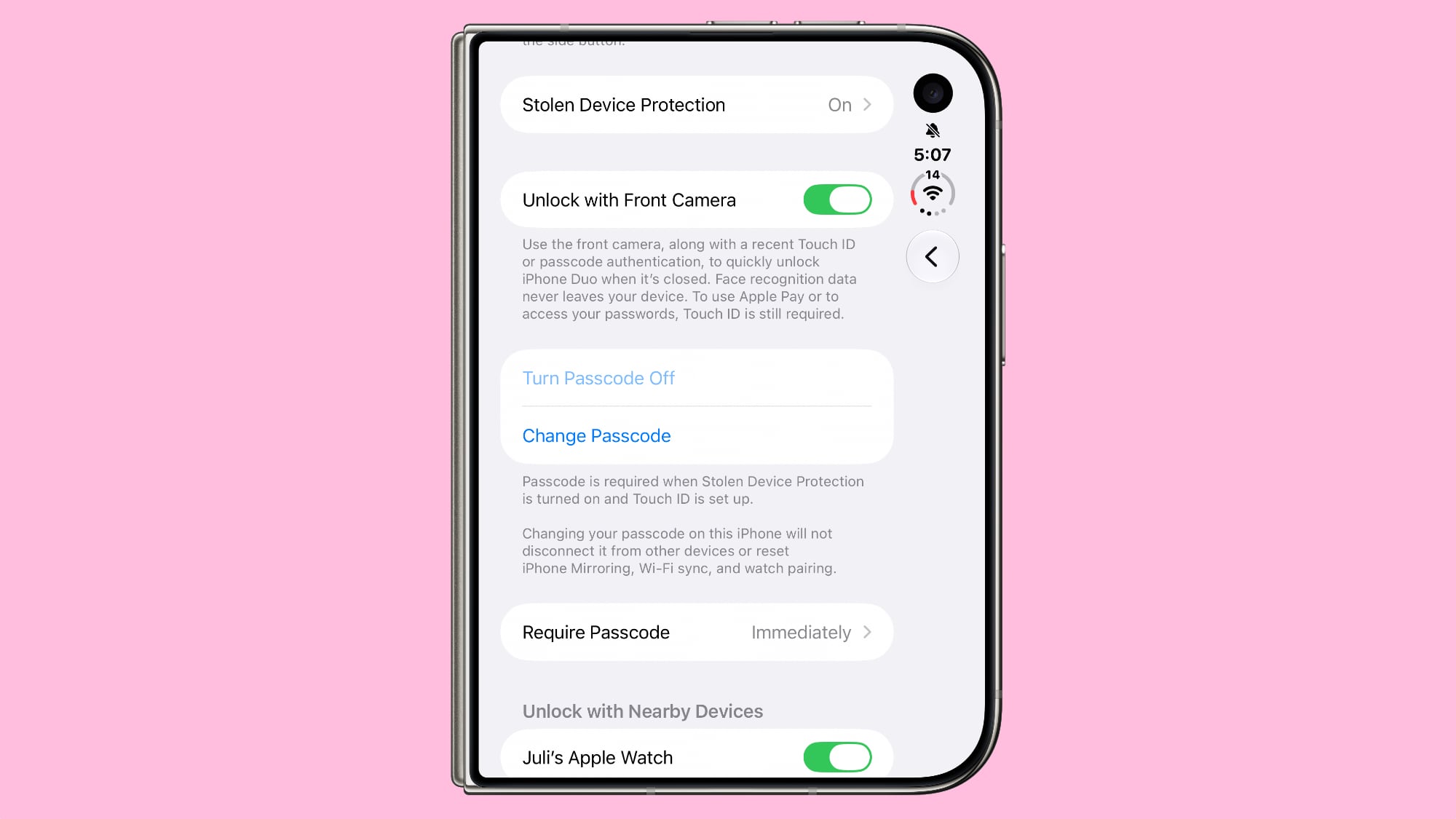
In the second developer beta, Apple introduced a facial unlock feature for the iPhone Duo that uses the front camera, along with an option to lock the ‌iPhone Duo‌ when it's closed.

The redesigned Health app is now available with custom Insights and Longevity information, and the ‌iPhone Duo‌ supports Reachability. There's a new Selfie Sing feature in Apple Music, plus changes to StandBy on non-Duo iPhones. Apple has started testing Apple Intelligence and ‌Siri‌ AI usage limits, with extra access available through iCloud+ plans. A full list of what's new in the beta can be found in our guide.

On the Apple Watch Series 12 and Ultra 4, Audio Intelligence features Live Rewind and ‌Siri‌ Recap are available for testing. Live Rewind creates a transcript of the last 15 seconds of speech, and ‌Siri‌ Recap offers a high-level summary of conversations throughout the day.

‌macOS Golden Gate‌ 27.3 has the same Safari features, and it brings Live Activities to Macs without a Dynamic Island.

To get the new betas, you can sign up on Apple's beta testing website. After you're signed up, the betas can be installed through the Software Update section in the Settings app on each device.

We're expecting all of Apple's updates to launch in December.
Related Roundups: iOS 27, iPadOS 27, macOS Golden Gate
Related Forums: iOS 27, macOS Golden Gate

This article, "Second iOS 27.3 and macOS Golden Gate 27.3 Public Betas Now Available" first appeared on MacRumors.com

Discuss this article in our forums
  •  

Everything New in iOS 27.3 Beta 2

Apple released the second beta of iOS 27.3 today, and like the first beta, it has several major new features. There are improvements to the iPhone Duo, tweaks to apps, new Siri features, and more.


iPhone Duo Face Unlock


Apple added a new option to quickly unlock the iPhone Duo using the front-facing camera. The option is only available when the ‌iPhone Duo‌ is closed, and it can only be used on the Lock Screen.


Authenticating with Touch ID is required for Apple Pay purchases and for accessing passwords and logins. Unlocking with the camera requires recent ‌Touch ID‌ or passcode authentication, and ‌Touch ID‌ is required again after about 45 minutes of inactivity.

Unlocking with the front-facing camera does not work when the ‌iPhone Duo‌ is open, presumably because the under-display camera is not high enough quality. The face unlock feature can be turned on in the Settings app under ‌Touch ID‌ and Passcode.

iPhone Duo Lock When Closed


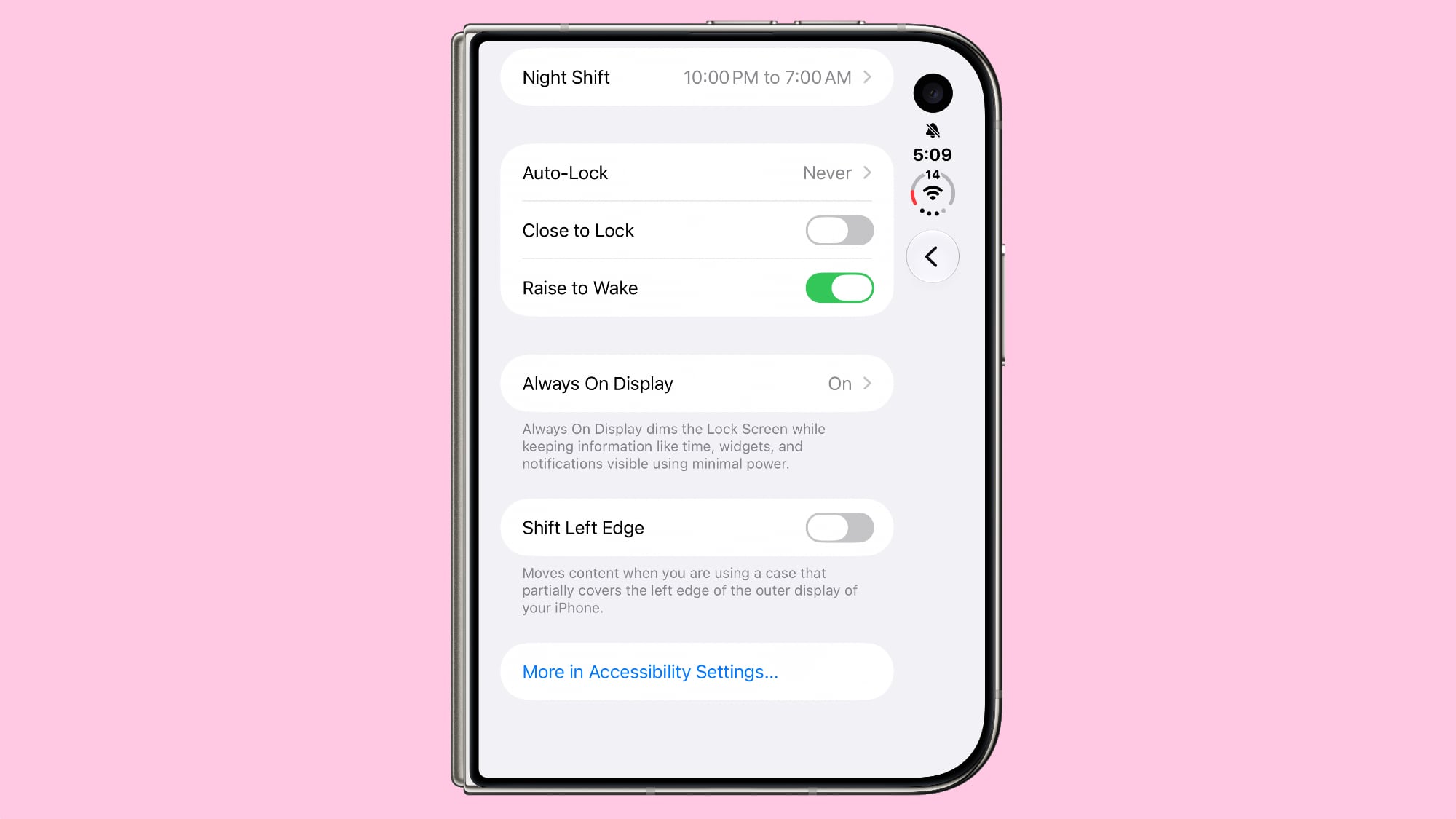
Apple added an option to lock the ‌iPhone Duo‌ when it's closed instead of transferring content to the front display.


Close to Lock can be turned on in the Display and Brightness section of the Settings app.

Siri AI


There's a new "Ask About Page" feature for ‌Siri‌ AI that lets ‌Siri‌ see the entire content of a webpage, even if it's not currently in view on the screen.

‌Siri‌ AI can also now access Health data when given permission, and control over smart home products has improved.

Apple Intelligence and Siri AI Usage Limits


iOS 27.3 introduces the Apple Intelligence usage limits cxdApple has been warning about for months. ‌Siri‌ AI and ‌Apple Intelligence‌ features that use server-side processing will now have daily usage limits on a per-device basis.

Extra access is tied to 200GB and higher iCloud+ plans. The 200GB plan gives up to 2x usage, the 2TB plan is up to 5x, the 6TB plan is up to 10x, and the 12TB plan is up to 20x.

Limits apply to complex ‌Siri‌ AI requests that involve multiple steps, image generation and editing tools, AI workflows and automations in Shortcuts, and third-party apps that use Apple Foundation Models in Private Cloud Compute. More information can be found in our article on the new limits.

Calendar


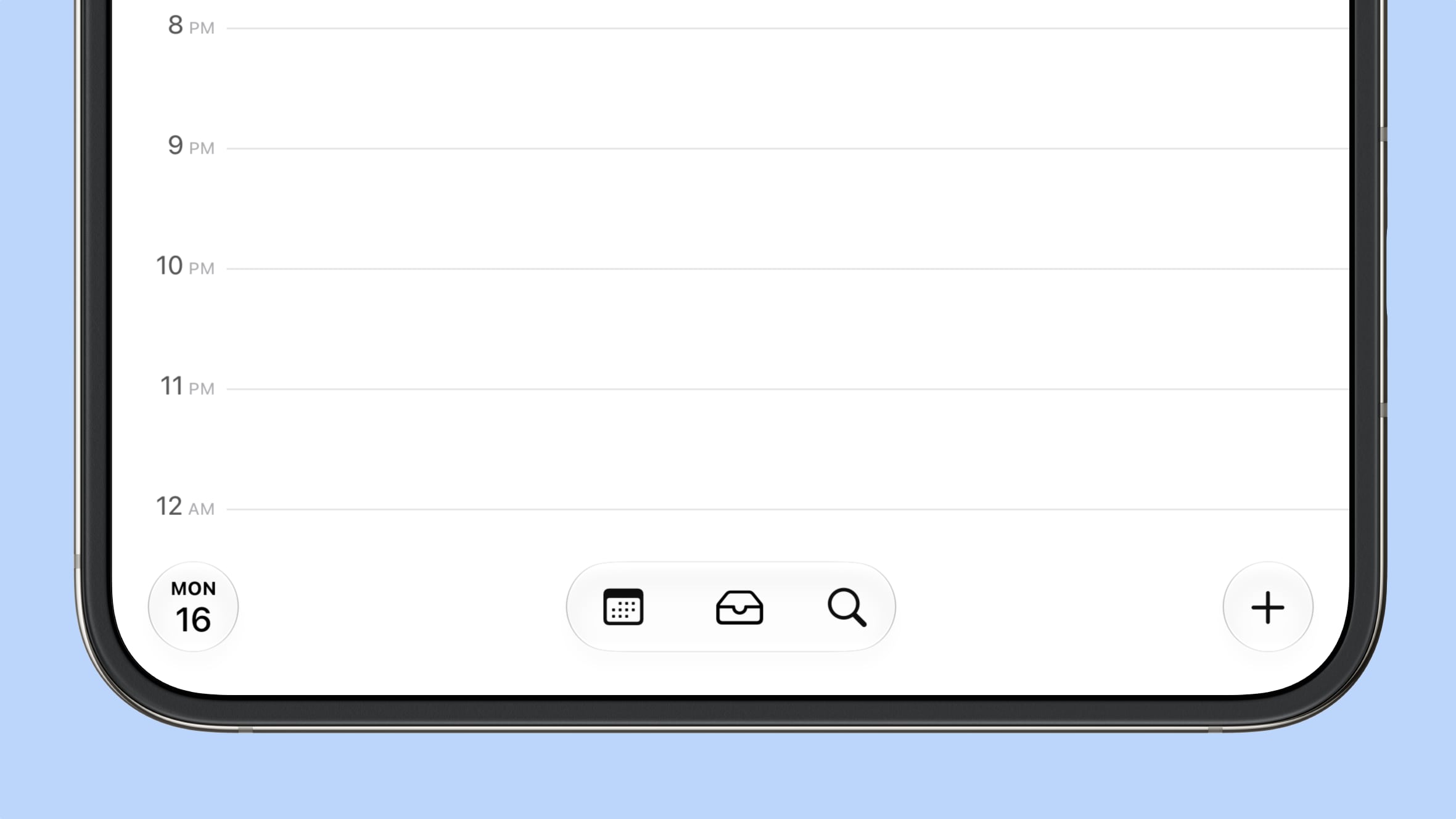
The Calendar app has an updated layout with the options for searching and adding an event moved to the bottom of the app. The "Today" button that takes you to the current date has also been updated to show the date.


Apple TV App Podcasts


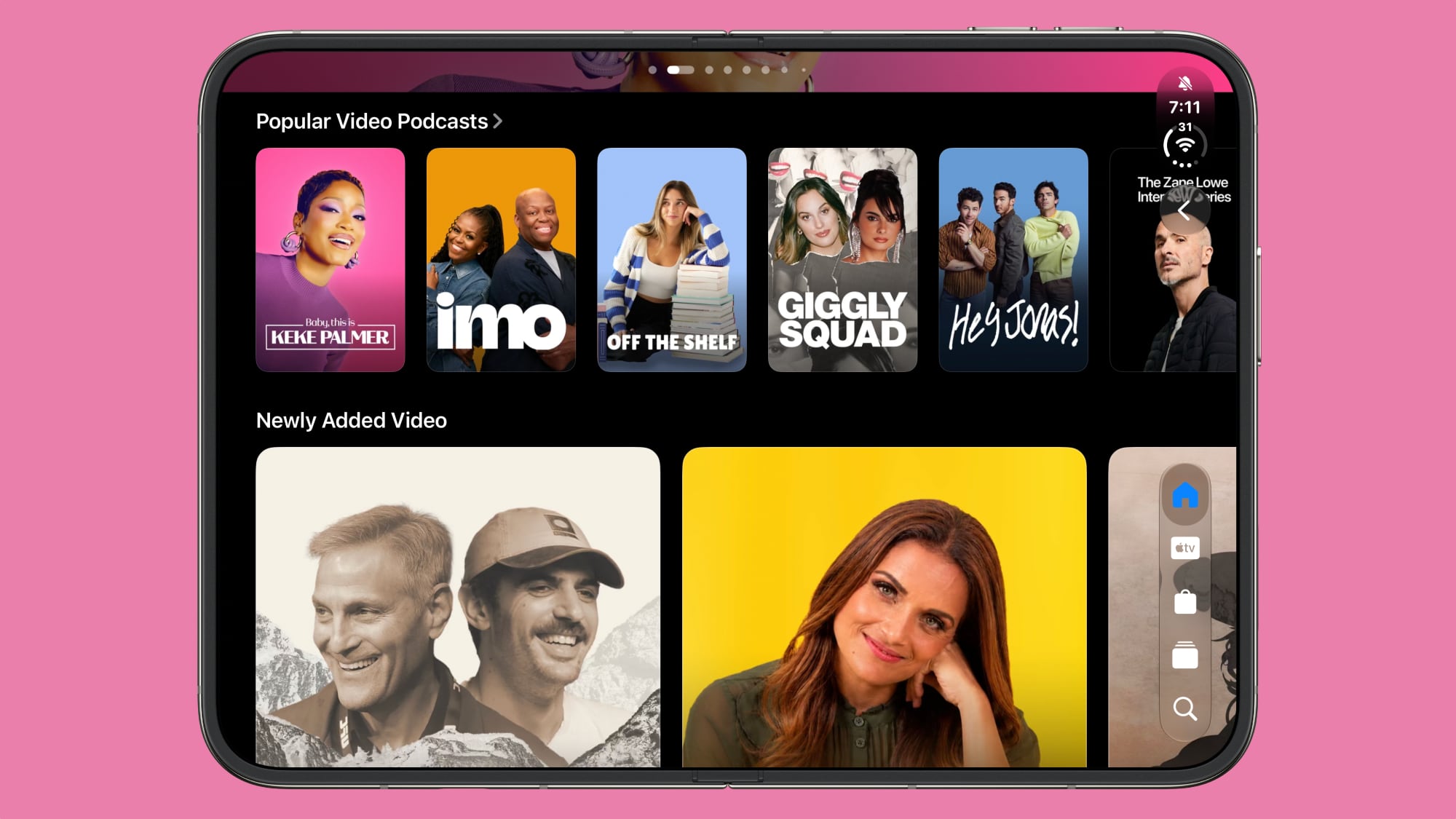
Video podcast episodes are now available in the Apple TV app. Only video podcasts that are free will show up in the ‌Apple TV‌ app.


Apple News+ Puzzles


Apple News+ Puzzles are expanding to Australian, UK, and French-Canadian ‌Apple News‌+ subscribers.

Subscribers in Australia get access to a daily quick crossword, crossword mini, Sudoku, Quartiles, and Emoji Game. UK subscribers get the daily quick crossword, crossword mini, and Sudoku, while French-Canadian subscribers can play Quartiles and Emoji Game.

Weather App


There are 10 new weather condition symbols in the Weather app, but Apple doesn't appear to be using them yet.

The Weather app gets 10 new weather-condition symbols in iOS 27.3 beta 2. https://t.co/1c5W4n5gKn

— pdfu (@itspdfu) November 16, 2026


Home App


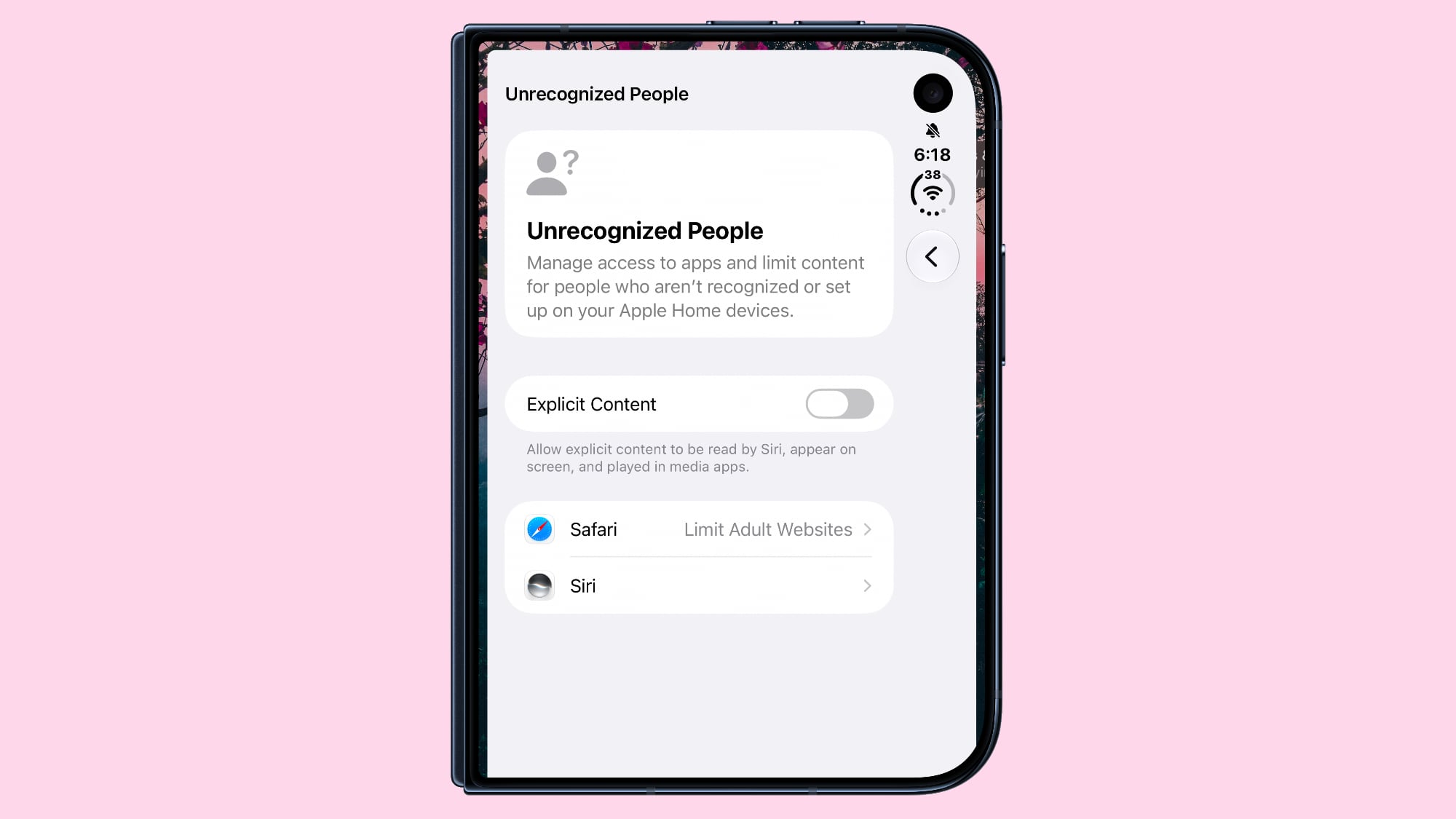
The Home app has an "Unrecognized People" section that limits how guests can use Safari and ‌Siri‌ on Apple home devices.


Apple Music


There's code in Apple Music for an album release countdown, but it doesn't appear to be active yet.
Related Roundups: iOS 27, iPadOS 27
Related Forum: iOS 27

This article, "Everything New in iOS 27.3 Beta 2" first appeared on MacRumors.com

Discuss this article in our forums

  •  

Hands-On With the iPhone Duo's New Face Unlock

With iOS 27.3 beta 2, Apple is partially solving a common iPhone Duo complaint. There's a new feature for unlocking the device with the front camera, which we've tested out.


Unlock with Front Camera is a new option in iOS 27.3. If you turn it on, you can quickly unlock the ‌iPhone Duo‌ when it's closed.

It's a feature that only works at the Lock Screen when the Duo is closed, so you can't use it for authenticating Apple Pay purchases or inserting logins and passwords from the Passwords app. You also need to use Touch ID or a passcode for unlocking the ‌iPhone Duo‌ when it's unfolded.

Face unlock can be turned on in the ‌Touch ID‌ & Passcode section of the Settings app, and it works fairly well when it's active. You aren't going to have much luck in a dark room because it's just using the standard front camera, but if the lighting is decent, you can unlock without ‌Touch ID‌.

Apple also added a "Close to Lock" feature that locks the ‌iPhone Duo‌ when you close it instead of transferring content to the outer display.

These features are in the latest developer beta and will be available to everyone when iOS 27.3 is released in December.
Related Roundups: iOS 27, iPadOS 27, iPhone Duo
Buyer's Guide: iPhone Duo (Buy Now)
Related Forums: iOS 27, iPhone

This article, "Hands-On With the iPhone Duo's New Face Unlock" first appeared on MacRumors.com

Discuss this article in our forums

  •  

iPad and Mac Get Apple Intelligence in China in 27.3 Betas

Today's iPadOS 27.3 and macOS 27.3 betas expand Apple Intelligence support in China to the iPad and the Mac.


‌Apple Intelligence‌ features debuted in China on the iPhone in the first iOS 27.3 beta, but they weren't initially available in iPadOS 27.3 or macOS 27.3. The Shanghai Cyberspace Administration said on November 9 that Apple had registered to bring ‌Apple Intelligence‌ to tablets and laptops.

Developers in China can test ‌Apple Intelligence‌ after updating to the second iPadOS 27.3 and macOS 27.3 betas. ‌Apple Intelligence‌ is available on Macs and iPads with an M-series Apple silicon chip, as well as the A17 Pro and A20 Pro ‌iPad‌ minis.

‌Apple Intelligence‌ in China does not include Siri AI, the ‌Siri‌ app, or the newer ‌Apple Intelligence‌ features in iOS 27, but it does include many of the features that debuted in the U.S. starting in iOS 18.1. ‌Siri‌, Writing Tools, and other features integrate with Alibaba's Qwen model, similar to the ChatGPT integration in other countries.

Here's what's live:

  • Live Translation for Messages, FaceTime, and the Phone app. Live Translation also works with AirPods 4 with ANC, AirPods Pro 2, and later models.

  • Writing Tools for rewriting, proofreading, and summarizing text. With Qwen integration, users can also generate text.

  • Visual Intelligence for identifying objects, places, and more.

  • Clean Up in Photos for removing unwanted objects from images.

  • Genmoji for creating custom emoji.

  • Natural language search and memory movie creation in ‌Photos‌.

  • Email summaries, suggested smart replies, and priority emails in the Mail app.

  • Notification summaries, urgent notifications, and the Reduce Interruptions Focus mode.

  • Summaries for audio recordings in the Notes app.

  • Call transcripts in the Phone app, which are saved to the Notes app.

  • Type to ‌Siri‌ and more natural ‌Siri‌ responses.

  • ‌Siri‌ can relay requests to Qwen to give more in-depth answers.


iOS 27.3, iPadOS 27.3, and macOS 27.3 will launch to the public in December.
Related Roundups: iOS 27, iPadOS 27
Related Forum: iOS 27

This article, "iPad and Mac Get Apple Intelligence in China in 27.3 Betas" first appeared on MacRumors.com

Discuss this article in our forums

  •  

Apple TV App Gets Video Podcasts in iOS 27.3

Video podcast episodes from the Podcasts app are coming to the Apple TV app in iOS 27.3, iPadOS 27.3, and the other 27.3 software updates.


‌Apple TV‌ app users will be able to discover and watch their favorite podcasts on the iPhone, iPad, Mac, ‌Apple TV‌ 4K, supported smart TV sets, set-top boxes with the ‌Apple TV‌ app, and CarPlay-enabled vehicles. Podcasts will be free to watch, with no ‌Apple TV‌+ subscription required. Podcasts that require a paid subscription will not be included in the ‌Apple TV‌ app.

Developers can access podcast video episodes in ‌Apple TV‌ with the second developer beta of iOS 27.3 that was released today.
Related Roundups: Apple TV, iOS 27, iPadOS 27
Buyer's Guide: Apple TV (Buy Now)

This article, "Apple TV App Gets Video Podcasts in iOS 27.3" first appeared on MacRumors.com

Discuss this article in our forums

  •  

iOS 27.3 Beta Adds Daily Siri AI Limits and iCloud+ Upgrades

With the latest iOS 27.3, iPadOS 27.3, and macOS 27.3 betas, Apple is starting to test limits and paid upgrades for Siri AI and Apple Intelligence features.


Every Apple device gets a free daily access allowance for Siri AI and ‌Apple Intelligence‌ features that rely on server-side AI processing, such as Image Playground and Clean Up in Photos. When that limit is hit, there will be an option to extend usage with an iCloud+ plan. Here's what will be limited after the daily allowance has been reached:


  1. ‌Siri‌ AI for multi-step, personal context requests that rely on server-side processing, such as asking ‌Siri‌ what time you need to leave from home to make it to a location on time.

  2. Image generation and editing tools, including ‌Image Playground‌ and the AI options in ‌Photos‌ like Clean Up, Extend, and Spatial Reframing.

  3. Workflows and automations in Shortcuts that rely on AFM Cloud and AFM Cloud Pro.

  4. Third-party apps that use Apple Foundation Models in Private Cloud Compute for AI features.


While more complex, multi-step requests will be restricted, basic ‌Siri‌ commands will continue to be available even after a device limit is reached. Examples of basic ‌Siri‌ commands include those with a single ask, such as "set a timer for 30 minutes" or "text Eric I'm on my way."

Apple's existing ‌iCloud‌+ plans will include higher daily usage for ‌Siri‌ AI and ‌Apple Intelligence‌, with no change in pricing. If you already subscribe to an eligible ‌iCloud‌+ plan, you will have higher usage limits. Free limits are per device, not per account, and do not roll over.

More access starts with the 200GB ‌iCloud‌+ plan, which is priced at $2.99 per month. Users who subscribe to this plan have up to a 2x usage limit. Users who subscribe to the $9.99/month 2TB plan get up to 5x usage. The $29.99/month 6TB plan comes with up to 10x usage, and the $59.99/month 12TB plan offers up to 20x usage. Family members who share a plan will have a shared usage pool.

  • 50GB - No limit increase

  • 200GB - Up to 2x limit

  • 2TB - Up to 5x limit

  • 6TB - Up to 10x limit

  • 12TB - Up to 20x limit


Every Apple device will use the free daily limit first, and when that's reached, ‌Siri‌ AI and ‌Apple Intelligence‌ will use the ‌iCloud‌+ paid access. In a family group, a device that hits the free limit will start drawing from the shared pool on a first-come, first-served basis. Limits will reset at around 12:00 a.m. in the user's current time zone, and in families, the reset is based on the plan purchaser's time zone.

Each of the four categories has a different limit, and Apple will likely use the beta testing period to refine those limits and make sure people aren't hitting their caps too quickly. Limits depend on feature category, request complexity, and system demand, and they could change over time.

Apple plans to give warnings when people are approaching their limits, and a notification when the limit has been hit. From there, users will be able to purchase additional access through an ‌iCloud‌+ plan, or wait for their limit to reset.

Apple is not planning to offer additional usage beyond what's available with the 12TB ‌iCloud‌+ plan at this time.
Related Roundups: iOS 27, iPadOS 27
Tag: Siri
Related Forum: iOS 27

This article, "iOS 27.3 Beta Adds Daily Siri AI Limits and iCloud+ Upgrades" first appeared on MacRumors.com

Discuss this article in our forums

  •  

iOS 27.3 Adds 'Ask About Page' Siri AI Feature to Safari

The second beta of iOS 27.3 includes a new "Ask About Page" feature for Siri AI.


‌Siri‌ can see the entire content of a webpage, including content that isn't currently in view on the screen. If you're looking at a website with a long menu, for example, you can ask ‌Siri‌ to surface all of the options that are gluten-free. Or if you're getting ready for a trip, you can ask ‌Siri‌ to read through a long guide and put together a packing list based on what's on the page.

Right now, ‌Siri‌ has on-screen intelligence, but it relies on what's in view. Access to a full webpage will make ‌Siri‌ more useful for summarizing content.

In the first beta of iOS 27.3, Apple expanded what ‌Siri‌ can do in and across apps like Calendar, Files, Finder, Journal, Mail, Maps, Messages, Music, Notes, Photos, Preview, Reminders, Safari, Shortcuts, and Weather.

In Mail, for example, ‌Siri‌ can unsubscribe you from mailing lists and undo recently sent messages. In Weather, ‌Siri‌ can add locations to your weather list, or control weather notifications. In Safari, ‌Siri‌ can clear browsing history, manage tabs and windows, save articles to a Reading List, and close duplicate tabs. In Files, ‌Siri‌ can organize content, delete files you haven't accessed for a set period of time, and more.

Apple is also allowing third-party integration for ‌Siri‌ AI, so any app will be able to bring its contents and actions directly into ‌Siri‌ AI.
Related Roundups: iOS 27, iPadOS 27
Tag: Siri
Related Forum: iOS 27

This article, "iOS 27.3 Adds 'Ask About Page' Siri AI Feature to Safari" first appeared on MacRumors.com

Discuss this article in our forums

  •  

Apple Adds Facial Unlock Option on iPhone Duo in iOS 27.3

Apple today added a new option for unlocking the iPhone Duo using the front-facing camera, giving device users multiple ways to access their content. The feature is available in the second iOS 27.3 beta.


The option to unlock with facial recognition is only available on the Lock Screen, and authentication via Touch ID is still needed for Apple Pay purchases, adding passwords and logins, and more.

Unlocking with the camera requires a recent ‌Touch ID‌ or passcode authentication, and ‌Touch ID‌ is required again after about 45 minutes of inactivity. Unlocking with the front camera can be enabled in the settings app under ‌Touch ID‌ and Passcode.

Apple is also adding a new option to lock the ‌iPhone Duo‌ when it's closed rather than transferring content to the front display. The is available under Display and Brightness in the Settings app.
Related Roundups: iOS 27, iPadOS 27, iPhone Duo
Buyer's Guide: iPhone Duo (Buy Now)
Related Forums: iOS 27, iPhone

This article, "Apple Adds Facial Unlock Option on iPhone Duo in iOS 27.3" first appeared on MacRumors.com

Discuss this article in our forums

  •  

iOS 27.3 Beta 2 Now Available for Developers

Apple today seeded the second betas of upcoming iOS 27.3 and iPadOS 27.3 updates to developers, with the software coming two weeks after the first betas were released.


Registered developers can download the betas by going to Settings > General > Software Update and opting in to the developer beta.

iOS 27.3 adds a new Vertical Tabs layout option that moves Safari tabs to the left side of the display. There's also an Adaptive Dark Mode for Safari that can turn light sites darker when ‌Dark Mode‌ is activated.

Siri AI can do more in and across apps with support for actions in Calendar, Files, Journal, Mail, Maps, Messages, Music, Notes, Photos, Preview, Reminders, Safari, Shortcuts, and Weather.

The new Health app is back, the iPhone Duo now supports Reachability, and there's a new Apple Music Selfie Sing feature if you want to capture videos of yourself while you do karaoke. There are more features too, with a list available in our iOS 27.3 beta guide.

iOS 27.3 will come out in December.
Related Roundups: iOS 27, iPadOS 27
Related Forum: iOS 27

This article, "iOS 27.3 Beta 2 Now Available for Developers" first appeared on MacRumors.com

Discuss this article in our forums

  •  

Apple Confirms iOS 27.3 Beta 2 Coming Today

Apple has indirectly confirmed that iOS 27.3 beta 2 will be released today. The company informed The New York Times that it will be adding a video podcasts section to the Apple TV app for developers to test starting Monday, so the next developer betas of iOS 27.3, macOS 27.3, and so forth should be coming today.

Update: Apple has released iOS 27.3 beta 2.
Related Roundups: iOS 27, iPadOS 27
Related Forum: iOS 27

This article, "Apple Confirms iOS 27.3 Beta 2 Coming Today" first appeared on MacRumors.com

Discuss this article in our forums

  •  

„Breakfast – understand your running“

14. November 2026 um 20:35

Ohne das Thema zu groß aufzuziehen, aber was ist der Preis von Software dieser Tage?

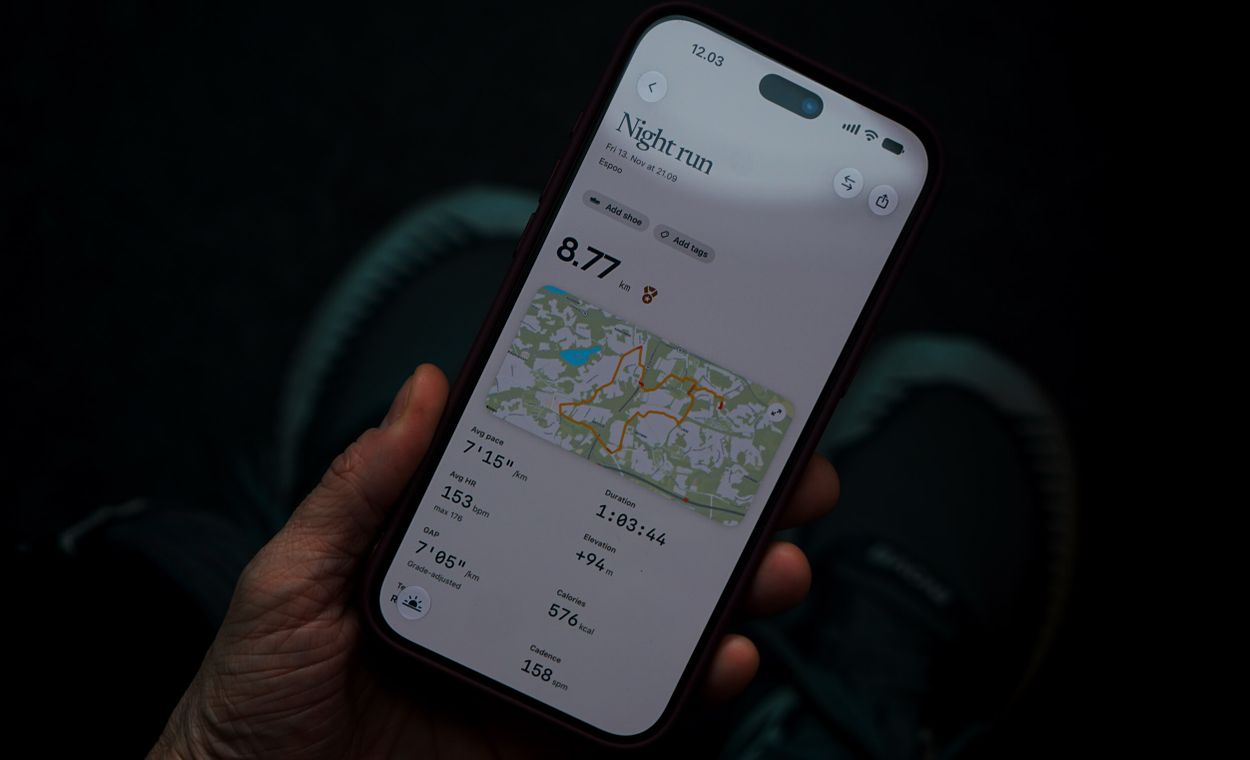
A hand is holding a smartphone displaying a running activity summary for a night run, showing distance covered as 8.77 km, pace, heart rate, duration, elevation, calories burned, and cadence, along with a mapped route of the run. The background shows a pair of running shoes.

Breakfast is made for runners who like to look at their training more closely. You can see how your pace and mileage change over time, track your gear and key metrics, and you can challenge yourself to improve.

Breakfast is developed by Matt Alexander, as part of 137 Ventures, in London.

breakfastrunning.club

Im Fall von Breakfast ist die Antwort sehr eindeutig: Null Euro – trotz exzellenter Aufbereitung der Apple-Health-Laufdaten.

Ich schätze den Fokus, den „Apps für einen selbst“ an den Tag legen. Lässt man Software für den Eigenbedarf schreiben, wovon ich hier ausgehe, bleiben Funktionen für die breiteste Zielgruppe schlicht außen vor. Kein Kaum „Share to social“, nur Features, die einem persönlich wichtig sind. Das ist nicht nur „gut genug“, sondern oft besser, weil fokussierter.

Bei Breakfast sind’s die Daten meiner Runs, die auch mir wichtig sind – von Trend-Prognosen über eine direkte Gegenüberstellung vorheriger Läufe bis zu persönlichen Bestzeiten sowie Zielen.

  •  

Here's What Apple Fixed in iOS 27.2.1 and macOS 27.2.1

The iOS 27.2.1, iPadOS 27.2.1, and macOS 27.2.1 updates Apple released today fix a handful of security vulnerabilities. With the security fixes implemented, it's a good idea to update as soon as you can.


A bug with iMessage could let a remote attacker join a group chat to receive its messages, and another could let users see messages sent before they joined a group chat.

Most of the vulnerabilities involved AirPlay and Bluetooth. A malicious Bluetooth device could pair without user interaction, and another bug could let a nearby attacker corrupt process memory. Several bugs could allow an attacker to bypass the rate limit on ‌AirPlay‌ pairing code attempts.

Apple credits itself on four of the vulnerabilities, so they were found internally.

With the macOS update, Apple also addressed the eMudhra certificate vulnerability, adding protections for command-line tools.

Apple did not say that the flaws have been exploited in the wild, but with the details on each vulnerability now public, devices that are not running the new software could be more vulnerable to attack.
Related Roundups: iOS 27, iPadOS 27
Related Forum: iOS 27

This article, "Here's What Apple Fixed in iOS 27.2.1 and macOS 27.2.1" first appeared on MacRumors.com

Discuss this article in our forums

  •  

Apple Releases iOS 27.2.1 With Bug Fixes

Apple today released iOS 27.2.1, a minor update to the iOS 27 operating system. iOS 27.2.1 comes two weeks after the launch of iOS 27.2.


iOS 27.2.1 includes addresses bugs and patches security vulnerabilities according to Apple's release notes for the update.

You can download iOS 27.2.1 over the air by going to Settings > General > Software Update.

Apple has also released iOS 26.7.3 and iOS 18.7.12 updates for devices not running ‌iOS 27‌.
Related Roundups: iOS 27, iPadOS 27
Related Forum: iOS 27

This article, "Apple Releases iOS 27.2.1 With Bug Fixes" first appeared on MacRumors.com

Discuss this article in our forums

  •  

„Computer Use“ baut Kurzbefehle

07. November 2026 um 10:09

Mit „Computer Use“ bedient ChatGPT die grafische Benutzeroberfläche von macOS. Das ist token-kostspielig, zeitintensiv und es löst Probleme, die quasi unmöglich zu umschreiben sind.

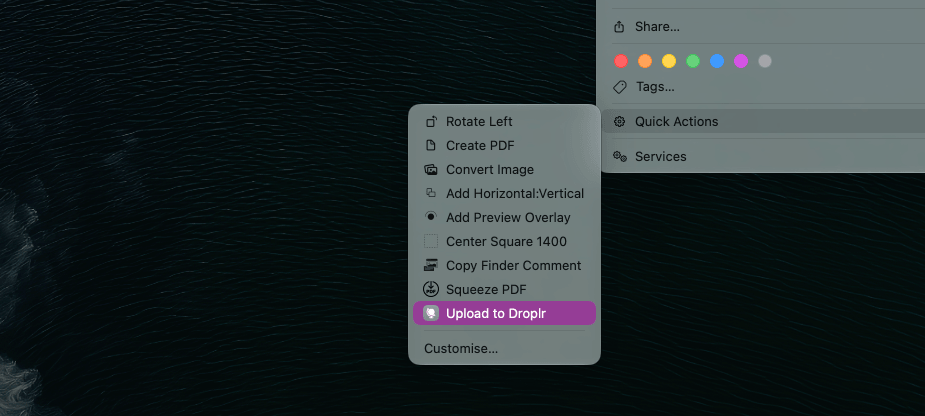
A right-click context menu shows a list of quick actions for a file, with "Upload to Droplr" highlighted in purple.

In dieser Woche hat mir die AI damit einen persönlichen „Upload to Droplr“-Shortcut zusammengeklickt – komplett eigenständig.

Hunderte von Kurzbefehle-Aktionen laden so eine ausgewählte Datei hoch und legen eine Kurz-URL in die Zwischenablage. Es war die einzige Funktion, die ich von Droplr nutze, und ich war nicht bereit, dafür ihre massive (Menüleisten-)App dauerhaft zu ertragen.

Auf macOS ist der Finder-Schnellbefehl ein Bash-Skript mit curl; auf iOS übernehmen native Kurzbefehle-Aktionen den Upload. Meine Droplr-Zugangsdaten liegen im Shortcut-eigenen „Store Content“, den die Kurzbefehle-App seit iOS 27 von den Shortcut-Befehlen trennt.

Durch seine Scripting- und Accessibility-Grundlagen hat sich macOS über Jahrzehnte ideale Voraussetzungen für „Computer Use“ erarbeitet, benötigt durch seine Pop-up-Nachfragen und Sicherheitsdialoge trotzdem dauerhaft einen Babysitter.

Nichtsdestotrotz: Auf dem Mac überprüfte die AI mit Tests und Bildschirmfotos selbstständig ihre Arbeit; ob’s dagegen auf iOS funktioniert, konnte sie lediglich mich fragen. 

Software ist und bleibt komplex; für viele zu kompliziert. Ich lasse GPT-6.1 Terra mittlerweile regelmäßig ans Steuer – selbst für Banalitäten.

„Computer Use“ hat nicht nur eine Zukunft, sondern ist schon heute gut genug – auch wenn’s noch verhältnismäßig teuer und langsam ist sowie unzählige Fragen über die Sicherheitsarchitektur aufwirft. Und natürlich gilt: Die KI von heute ist die schlechteste, die wir je erleben werden.

Aber wo stehen iOS und iPadOS in dieser Zukunft, in der ChatGPT sich selbst durch den Mac klickt?

  •  

The MacRumors Show: iOS 27.3 Looks Like a Huge Update

Apple's first 27.3 betas bring expanded Siri AI actions, a redesigned Health app, and new Fitness+ features, alongside conversation summaries on the Apple Watch. This week's episode of The MacRumors Show takes a closer look at the updates.

Subscribe to The MacRumors Show YouTube channel for more videos

‌Siri‌ AI gains additional actions across Apple's apps, including unsubscribing from mailing lists, organizing files, and managing Safari tabs. In Weather, ‌Siri‌ can add saved locations and toggle severe weather or next-hour precipitation notifications. The additions extend the assistant's usefulness for everyday tasks, although the full range of supported requests can still be difficult to discover.

A new developer preview also enables more flexible third-party integrations. Developers can supply custom actions and skills that help ‌Siri‌ coordinate multiple steps, improving its handling of more complicated requests. App Store submissions for these integrations are scheduled to open in the spring.

Safari adds vertical tabs and Adaptive Dark Mode, allowing websites without their own dark appearance to adopt one automatically. The iPhone Duo also gains horizontal Reachability and a revised keyboard, making its wider outer display easier to operate with one hand.

Apple Fitness+ gains Gym Strength, which creates personalized four-week plans based on available equipment and workout preferences. Short videos from Fitness+ trainers demonstrate proper form, extending the service beyond workouts that require following an entire video session. The initial beta's equipment selection and scheduling options nevertheless leave room for improvement, particularly for users whose routines vary from week to week.

The redesigned Health app returns with Insights and Longevity sections, turning collected measurements into more accessible guidance and longer-term health assessments. iPhone Duo-style StandBy mode displays bring more customizable clocks, Calendar views, and Weather information to additional iPhones. Apple Music also gains enhanced transitions, concert recommendations, and Selfie Sing karaoke videos.

On the Apple Watch, Live Rewind and Siri Recap introduce new ways to recover and summarize spoken information. Live Rewind provides a transcription of the preceding 15 seconds, while ‌Siri‌ Recap creates detailed conversation summaries that can be useful for meeting notes. Time- and location-based scheduling provides more control over when ‌Siri‌ Recap operates.

The MacRumors Show has its own YouTube channel, so make sure you're subscribed to keep up with new episodes and clips.

You can also listen to ‌The MacRumors Show‌ on Apple Podcasts, Spotify, Overcast, or other podcast apps. You can also copy our RSS feed directly into your player.


If you haven't already listened to the previous episode of The MacRumors Show, catch up to hear our discussion about Apple's newly announced OLED MacBook Pro, the iPad mini with A20 Pro, and M6 versions of the iMac and entry-level 14-inch ‌MacBook Pro‌.

Subscribe to ‌The MacRumors Show‌ for new episodes every week, where we discuss some of the topical news breaking here on MacRumors, often joined by familiar guests such as Tyler Stalman, Michael Fisher, Kayci Lacob, Kevin Nether, John Gruber, Mark Gurman, Jon Prosser, Luke Miani, Matthew Cassinelli, Brian Tong, Quinn Nelson, Jared Nelson, Eli Hodapp, Mike Bell, Sara Dietschy, iJustine, Jon Rettinger, Andru Edwards, Arnold Kim, Ben Sullins, Marcus Kane, Christopher Lawley, Frank McShan, David Lewis, Sam Kohl, Federico Viticci, Thomas Frank, Jonathan Morrison, Ross Young, Ian Zelbo, and Rene Ritchie.

‌The MacRumors Show‌ is on X @MacRumorsShow, so be sure to give us a follow to keep up with the podcast. You can also email us at podcast@macrumors.com or head over to The MacRumors Show forum thread. Remember to rate and review the podcast, and let us know what subjects and guests you would like to see in the future.
Related Roundups: iOS 27, iPadOS 27
Related Forum: iOS 27

This article, "The MacRumors Show: iOS 27.3 Looks Like a Huge Update" first appeared on MacRumors.com

Discuss this article in our forums

  •  

First iOS 27.3 and macOS Golden Gate 27.3 Public Betas Now Available

Apple today seeded the first betas of iOS 27.3, iPadOS 27.3, macOS Golden Gate 27.3, tvOS 27.3, and watchOS 27.3. The new software comes two days after Apple released the betas for developers.


iOS 27.3 is a major update that adds a Vertical Tabs layout option and Adaptive Dark Mode for Safari. Siri AI can do more in and across Apple's apps, and developers are now able to create actions for ‌Siri‌ to carry out.

The redesigned Health app is now available with custom Insights and Longevity information, and the iPhone Duo supports Reachability. There's a new Selfie Sing feature in Apple Music, plus changes to StandBy on non-Duo iPhones. A full list of what's new in the beta can be found in our guide.

On the Apple Watch Series 12 and Ultra 4, Audio Intelligence features Live Rewind and ‌Siri‌ Recap are available for testing. Live Rewind creates a transcript of the last 15 seconds of speech, and ‌Siri‌ Recap offers a high-level summary of conversations throughout the day.

‌macOS Golden Gate‌ 27.3 has the same Safari features, and it brings Live Activities to Macs without a Dynamic Island.

To get the new betas, you can sign up on Apple's beta testing website. After you're signed up, the betas can be installed through the Software Update section in the Settings app on each device.

We're expecting all of Apple's updates to launch in December.
Related Roundups: iOS 27, iPadOS 27, macOS Golden Gate
Related Forums: iOS 27, macOS Golden Gate

This article, "First iOS 27.3 and macOS Golden Gate 27.3 Public Betas Now Available" first appeared on MacRumors.com

Discuss this article in our forums
  •  

Die ersten Duo-Reviews

22. Oktober 2026 um 20:12

Was ich aus den ersten Reviews mitnehme: Das Duo löst keinesfalls den klassischen Formfaktor ab, sondern erweitert das Portfolio der iPhones. Damit steht es im starken Kontrast zum iPhone X, das die Homebutton-Generationen, die vor ihm kamen, damals augenblicklich beerdigte.

Die Testberichte sind durch die Bank weg lang – teilweise ungewohnt ausartend. Gruber schrieb 8500 Worte; Brownlee filmte 29 Minuten. Ja, es gibt diesmal außergewöhnlich viel zu sagen, gleichermaßen aber auch viele unbeantwortete Fragen.

Man merkt: Die Vorberichte kämpfen nach einer Woche mit den gleichen Fragen, die Apple seit einigen Jahren für das Duo umtreiben. iPad-Apps: Ja oder nein? Ist Touch ID gut genug für diese erste Generation? Passt die „Passport“-Größe?

David Imel schätzt den „aufgaben-orientierten“ Screen; für Nilay Patel ist es maximal ein „status display“. Die Nanotextur­beschichtung der Innenseite und das Scharnier stauben dagegen überall Lob ab.

Was auffällt: Telefonnutzung ist sehr individuell. Die Frage nach der Akkulaufzeit variiert in ihrer Bewertung etwa von „hervorragend“ bis „gerade noch gut genug“.

Apple schoss sich direkt in den eigenen Fuß, indem es App-Store-Updates fürs Duo nicht früher akzeptierte. „Ausstehende Software-Unterstützung“ von Dritt-Apps nimmt in allen Testberichten einen substanziellen Themenblock ein. Mein Gefühl sagt mir inzwischen: Das wird in wenigen Wochen kein dominantes Thema mehr sein.

Software(-Design) bleibt natürlich eine konstante Diskussion; die schlichten Anpassungen an die Bildschirmgröße räumen die meisten Apps aber alsbald vom Tisch. Das Duo steckt nicht in einer Vision-Pro-Situation: Software, die sich nicht anpasst, wechseln Kund:innen aus. Ausnahmen bestätigen diese Regel.

Und welche Apps das Aufklappen rechtfertigen, wer kreativ Menü-Buttons setzt, sind keine Fragen für die erste Woche, sondern für das erste Jahr.

Einige Videoclips haben mich besorgt zusammenzucken lassen: Die Drehung des Duos im aufgefalteten Zustand sieht gelegentlich nicht sehr souverän aus.

Zugegeben: Das liegt auf der Hand (!), ist aber interessant zu beobachten. Ein neues iPhone, das man erstmals neu lernen muss. Angefangen bei den Platzierungen der Hardware-Buttons, die ich so kontrovers nicht vermutet hatte.

HTX Studio bringt, in einem außergewöhnlichen Video, speziell den Kompromiss der Bildschirmgröße noch einmal auf den (Schluss-)Punkt – den man wahrscheinlich nur durch eigenes Ausprobieren für sich beurteilen kann:

Will they become mainstream? I still doubt it because this design has two fundamental conflicts at its core. First, the two screens work against each other. Improve the outer screen and the inner screen becomes a big empty square. Favour the inner screen and the outer screen becomes a passport that’s hard to grip. It’s a zero-sum game. More importantly, whatever the balance, you get a makeshift phone outside and a cut-down tablet inside. Neither delivers the best experience.

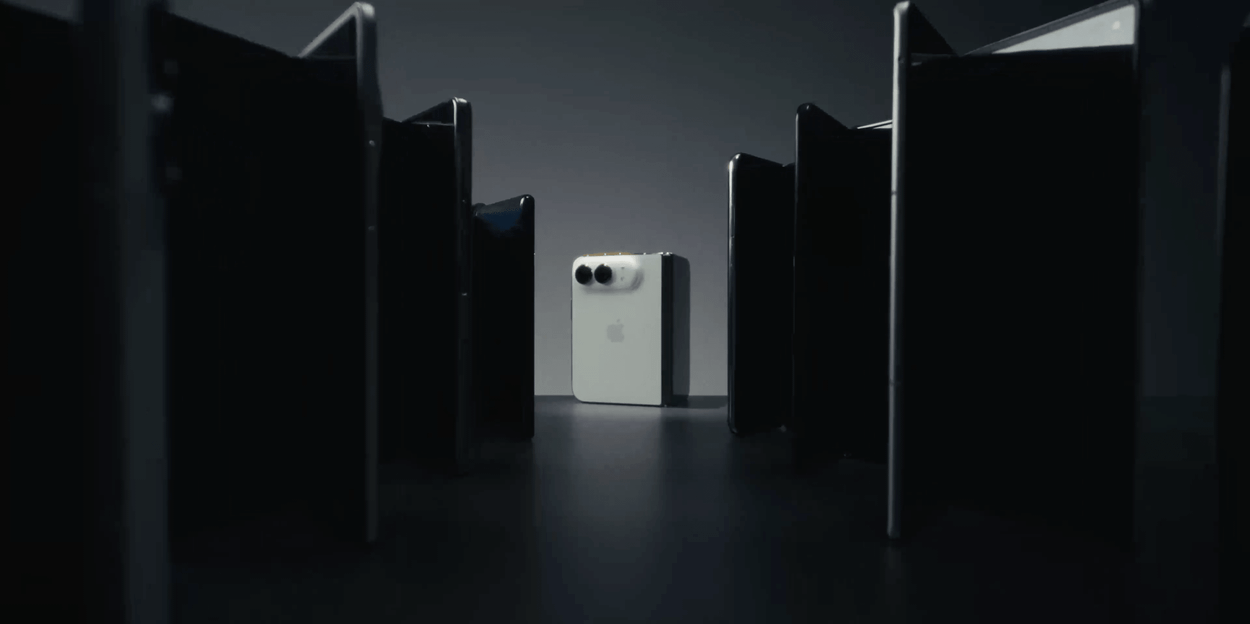
A white smartphone with a dual-camera setup is centrally placed on a dark surface, surrounded by several black smartphones standing upright in a semicircle, all against a dark background.
  •  

Unboxing – das iPhone 18 Pro Max

19. September 2026 um 10:02

➝ YouTube

Mein Live-Unboxing, hier noch einmal hochauflösend fürs Archiv.

Das 18 Pro ist inzwischen frisch eingerichtet; zwei Stunden hat es diesmal gedauert. Es sind Kleinigkeiten wie das Setup der Wallet-Kreditkarten, die ausbremsen.

Den Prozess habe ich für mich über die Jahre allerdings weitgehend gestrafft – Bankkonten mit verkopften Anmeldeprozeduren sind abgestoßen. Meine Passwort- und Lizenz-Datenbanken sind aufgeräumt. „Passkeys all the way“ – zumindest überall dort, wo sie angeboten werden.

Und ja: Einmalcodes, die per Mail kommen, nerven – sogar ungemein. Allerdings hat der Anbieter dann nie ein Kennwort, das er verdödeln kann.

Was wirklich ärgert: Apples vorinstallierte iOS-Software. Diese Apps einzeln runterzuwerfen, fühlt sich wie eine kleine Ewigkeit an. Aber andersherum: Apps zum Download lassen sich flotter über Spotlight finden als im App Store.

Die meiste Zeit geht für persönliche Einstellungen drauf, die ich unbedingt ändere. Etwa die 4K-Videoaufnahmemodi, alle Anpassungen ans Teilenmenü oder dass etwa iMessages nach 30 Tagen automatisch gelöscht werden.

Allerdings sind es genau diese Einstellungen, durch die sich ein neues Telefon neu anfühlt. Welches alternative App-Icon? Wo platziert?

All das fühlt sich wie ein Umzug an, bei dem man seine Wohnung neu einrichtet – Wände streicht und Möbel rückt. Wie ein Herbstputz ist das anstrengend, aber auch sehr befriedigend.

💾

  •  

#523 – mehr Kleinigkeiten aus iOS 27

16. September 2026 um 14:17

Vier Monate später trugen sich mehr Kleinigkeiten zusammen; iOS 27 ist ein Trog mit vielen kleinen „Quality of Life“-Verbesserungen.

Die Zusammenstellung dieser unscheinbaren Änderungen in jedem Sommer führt regelmäßig zu meinen absoluten Lieblingsvideos.

Hier das Intro der Episode:

Weiterlesen

💾

  •  

„Swipe Down for Search or Ask“

15. September 2026 um 09:51

Ohne Spracheingabe bestand am iPhone nie die Möglichkeit, Spotlight außerhalb des Home- und Sperrbildschirms aufzurufen. Mit Siri AI geht das jetzt – nur nicht bei uns.

Wenn wir über fehlende Funktionen für iOS 27 in der EU sprechen, fehlt mir insbesondere diese Interaktion.

Spotlight, as you know it, is gone in iOS 27. Swiping down from the middle of the Home Screen now opens Search or Ask, where you can type or speak to Siri. Apple rebuilt the underlying search index at the same time, so returned results are more current.

via MacRumors

Für iPadOS existiert ein solcher Hack; fürs iPhone nicht. Apples Telefon benutzt sich signifikant besser, wenn man Spotlight auch aus geöffneten Apps heraus aufrufen kann.

  •  
❌