
❌

Normale Ansicht

Final Cut Pro Now Includes MotionVFX for Creator Studio Users

Apple today updated Final Cut Pro (FCP), adding MotionVFX integration. Apple purchased the company earlier this year, so now the MotionVFX library is part of FCP. It includes the templates, titles, themes, effects, layouts, and transitions that are popular with creators.


MotionVFX graphics and effects can be dropped into a video timeline, and 3D titles and graphics can be added to a scene on moving surfaces or at a natural depth that matches camera movement. Masking improvements make it quicker to add outlines, accents, motion trails, and more to video subjects, and static photos and illustrations can be turned into animations.

There's a new Content Hub with access to stock video, photos, graphics, and backgrounds. Creators can also generate images in FCP with text descriptions, and then edit those images. Any image from an FCP project can be opened in Pixelmator Pro for editing, and then added back to FCP when editing is finished.

Apple added easing options for more precise control over animation, and there's a new timeline command for detaching a clip from the primary storyline to reposition it freely without affecting B-roll, titles, and audio.

The new features are included in the Creator Studio version of Final Cut Pro, so you will need a Creator Studio subscription to use them. Creator Studio is priced at $12.99 per month and includes access to Final Cut Pro, Logic Pro, Pixelmator Pro, Motion, Compressor, and special features in free apps like Pages, Keynote, and Numbers.

The one-time purchase version of Final Cut Pro does not include the new additions.

Update: Apple's outage today has delayed the release of the Final Cut Pro update, but it should be out shortly.
This article, "Final Cut Pro Now Includes MotionVFX for Creator Studio Users" first appeared on MacRumors.com

Discuss this article in our forums
  •  

Paid $200 for Logic Pro? Apple Says You Won't Get This New Feature

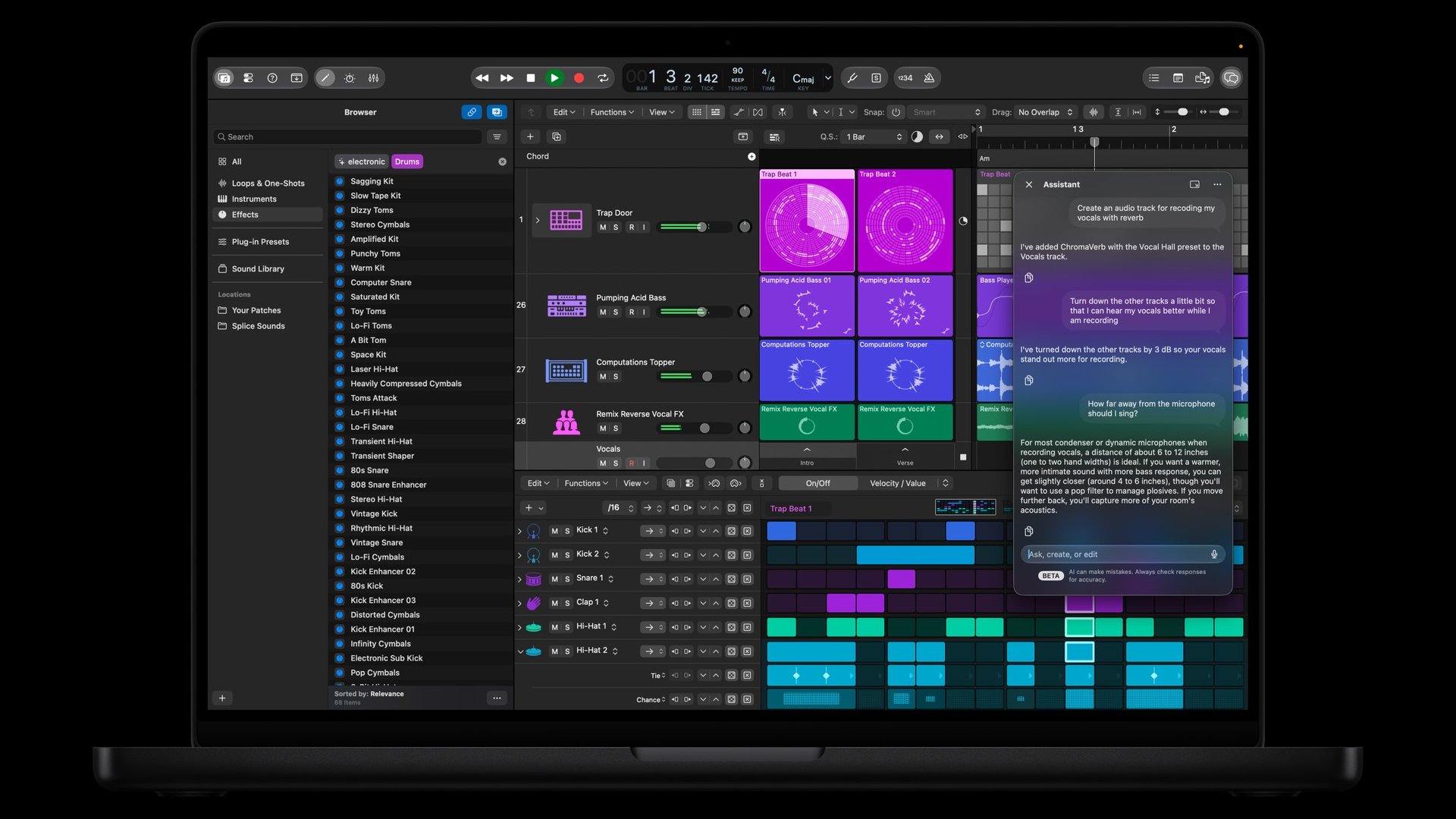
According to Apple's full release notes for version 13.0 of Logic Pro for Mac, released today, the new AI-powered Intelligent Assistant feature requires an Apple Creator Studio subscription for $12.99 per month or $129 per year. In other words, the feature is not available in the $199.99 one-time purchase version of Logic Pro.


Apple's fine print on the Logic Pro release notes page:
The intelligent assistant (beta) requires an Apple Creator Studio subscription, a Mac with Apple silicon, and macOS 27 or later.
Indeed, the release notes for the one-time purchase version of Logic Pro for Mac version 13.0 do not mention Intelligent Assistant.

The subscription requirement was not mentioned in Apple's announcement last month:
The assistant (beta) in Logic Pro for Mac requires macOS 27 Golden Gate or later on an Apple Intelligence-capable Mac and is available in U.S. English only.
Apple customers who are growing tired of features being locked behind a subscription will obviously be disappointed to learn this news.

Logic Pro's Intelligent Assistant likely requires a Creator Studio subscription because it uses cloud AI models. In a support document, Apple said the feature will have monthly usage limits, with expanded usage available for a fee.

Apple says the Intelligent Assistant is powered by a combination of Apple-built and third-party AI models. The feature is designed to help creators "navigate production workflows, start a new song, set up a vocal track from a single prompt, or refine an active project." Except for creators who opted to pay $199.99 upfront for Logic Pro, that is.
This article, "Paid $200 for Logic Pro? Apple Says You Won't Get This New Feature" first appeared on MacRumors.com

Discuss this article in our forums

  •  

Apple Creator Studio App Updates Rolling Out, Starting With Logic Pro

Apple today began rolling out the Creator Studio app updates that it announced last month. Both the Creator Studio version and standalone version of Logic Pro for the Mac were updated today, and the remaining app updates will come out later in November.


MacStories editor John Voorhees tested the updated Creator Studio apps over the past week and has shared his impressions of the new features.

Logic Pro for Mac has received a new Liquid Glass design, an AI-powered Intelligent Assistant feature that can help you build beats using natural language, a redesigned browser that centralizes things from loops and instruments to patches and plug-in presets, an enhanced Stem Splitter that now separates drums, and more.

Sidecar support will turn an iPad into a multi-touch controller for Logic Pro on the Mac.

Apple says Intelligent Assistant requires a Creator Studio subscription, so that feature will not be available in the one-time purchase version.

Here are the Logic Pro version 13.0 release notes for the one-time purchase version, which costs $199.99:
Version 13.0 - Unified Browser

• Find the perfect sound faster with a redesigned browser that brings your entire library into one place — loops, one-shots, instrument and effect patches, and plug-in presets

• Add your own custom or third-party sound to the browser and Logic Pro uses music understanding to analyze and classify them, applying tags that make even massive sample libraries easily searchable

• Narrow results with dynamic tag filtering, or describe what you're looking for in plain terms like "atmospheric pad" or "lo-fi kick"

• Find similar sounds or samples across your entire collection with ease

• Browse your licensed Splice sounds alongside the rest of your library

• Add any folder on your Mac as a Browser location for instant access to your personal collection

Enhanced Stem Splitter

• Break the drum stem into individual tracks — kick, snare, hi-hat, toms, cymbals, and other percussion

• Rebalance your entire drum mix without ever needing the original multitracks

All-New Liquid Glass Design

• Bring clarity to your workflow with translucent surfaces and deeper contrast — menus, toolbars, and windows feel lighter and more refined

Sidecar Support

• Transform your iPad into a Multi-Touch controller for Logic Pro on your Mac

• Tap to trigger cells in Live Loops, populate Step Sequencer patterns, adjust plug-ins and instruments, and control multiple mixer channels at once

Play Surface

• Play instruments with a resizable performance window — trigger drum and chord pads with your typing keyboard and mouse, or tap your iPad using Sidecar

• Play a musical keyboard with controls for velocity, modulation, and polyphonic pitch glide

• Make beats by triggering drum pads and use note repeat to add rolls — perfect for trap hats

• Customize Chord pads to follow the Chord track in realtime, so every chord and note you play fits perfectly

Step Sequencer Multi-Select

• Select a range of steps with a drag or Shift-click, then adjust velocity, note repeat, or any parameter for the entire selection at once

• Copy and paste groups of steps to new positions or rows, and use dedicated key commands to select all steps in a row, invert a selection, or nudge selected steps
Apple has more detailed Logic Pro release notes in a support document.

For $12.99 per month or 129 per year in the U.S., a Creator Studio subscription provides access to full-featured versions of Final Cut Pro, Logic Pro, Pixelmator Pro, Motion, Compressor, MainStage, Keynote, Pages, Numbers, and Freeform.

One-time-purchase versions of Final Cut Pro, Logic Pro, Pixelmator Pro, Motion, Compressor, and MainStage remain available on the Mac App Store.

Free versions of Keynote, Pages, Numbers, and Freeform continue to be available, but they do not receive all of the new Creator Studio features.

When the remaining updates are released, we will let you know.
This article, "Apple Creator Studio App Updates Rolling Out, Starting With Logic Pro" first appeared on MacRumors.com

Discuss this article in our forums

  •  
❌