❌

Lese-Ansicht

Apple Launches Two Products Today

Apple is releasing two new products today, Friday, November 13: the all-new Apple HomeView and the fourth-generation Apple TV 4K, both of which have been available to pre-order since mid-October.
  • Apple HomeView: Apple's new smart home display, powered by Apple Intelligence with Siri AI, for entertainment and managing the home. Available in tabletop and wall-mounted models, it can recognize up to six users by face, each with a personalized Home Screen. The HomeView is priced at $299.

  • Apple TV 4K: adds Siri AI, the A19 chip, an updated Siri Remote with Find My, and support for four-speaker surround sound with HomePod mini 2. The Apple TV 4K comes with 128GB of storage and is priced at $299.
Both products were announced on October 13 alongside the HomePod mini 2, which launched October 30.

As things stand, HomeView is not sold in the European Union because Siri AI is currently unavailable on iOS in the region due to regulatory constraints. Apple has said it is "working constructively with the EU in an attempt to find a path forward," but has provided no timeline for EU availability.
This article, "Apple Launches Two Products Today" first appeared on MacRumors.com

Discuss this article in our forums
  •  

Rumored Apple Smart Glasses Mentioned in Supplier's Earnings Briefing

Apple's rumored smart glasses and AirPods with cameras may have been referenced by Chinese manufacturing equipment supplier Quick Intelligent Equipment, according to a Securities Times report on the company's quarterly earnings briefing. The company claimed it has been involved in "Apple's AI glasses and new smart earphones projects," which could boost demand for its machine vision inspection equipment.
Apple is reportedly targeting a late 2027 launch for its first smart glasses, expected to help answer questions about the wearer's surroundings and translate languages. Apple is also reportedly developing AirPods with cameras, set to arrive alongside the 20th-anniversary iPhone.
This article, "Rumored Apple Smart Glasses Mentioned in Supplier's Earnings Briefing" first appeared on MacRumors.com

Discuss this article in our forums

  •  

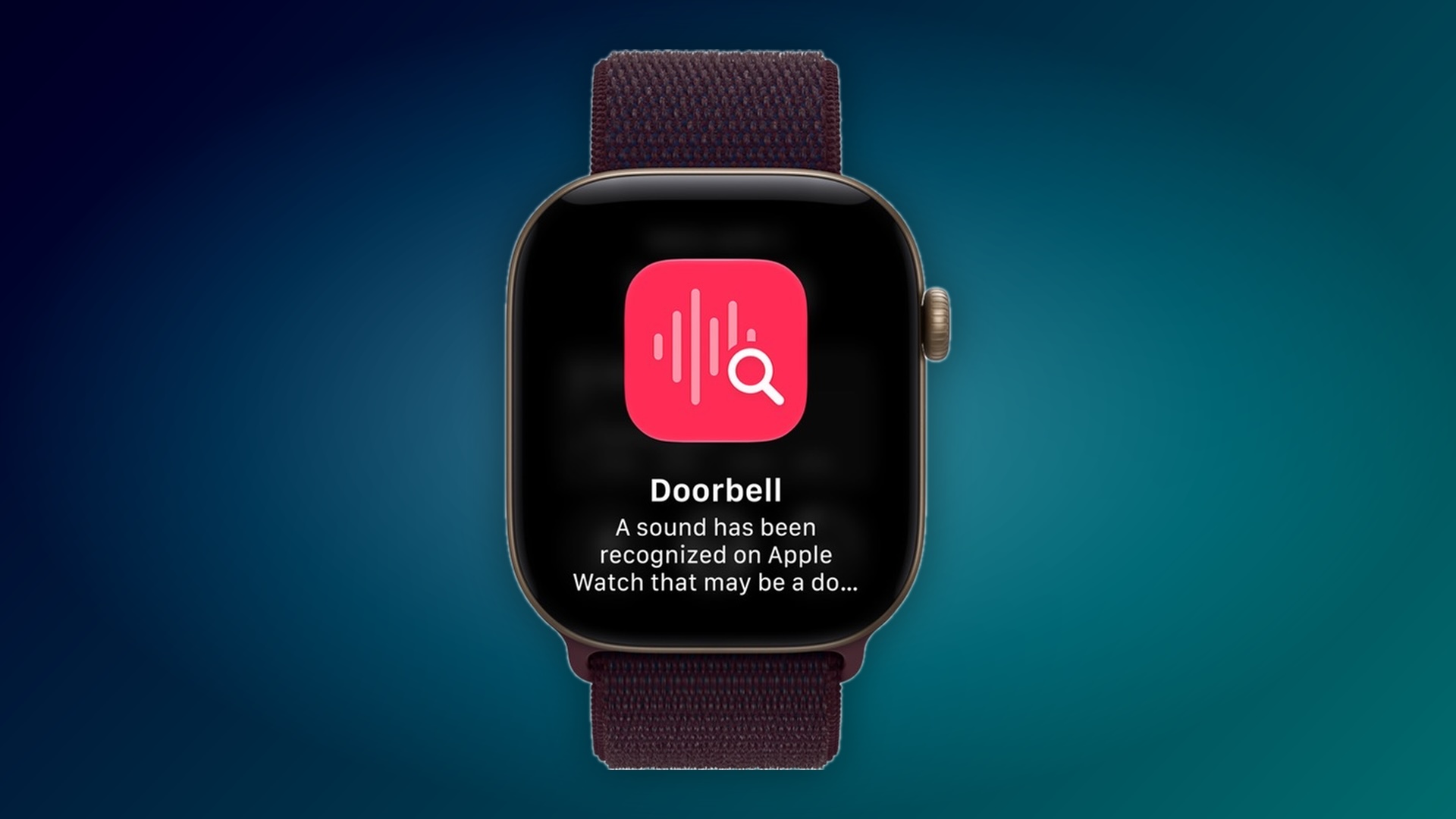
Make Apple Watch Listen for Sounds Like the Doorbell

One of Apple's accessibility features on iPhone can listen for important sounds around you, such as a doorbell, siren or alarm, and it sends you a notification when it hears one. The feature has been extended to Apple's new Apple Watch Series 12 and Apple Watch Ultra 4 models, so the alert reaches your wrist even when your iPhone isn't with you.


It's especially useful for people who are deaf or hard of hearing, but it has everyday uses too. If you wear noise-cancelling headphones while working and don't want to miss the doorbell – if you're expecting a delivery, for example – your Apple Watch can alert you.

Sounds Your Apple Watch Can Detect


Sound Recognition can detect the following 15 sounds. Any you switch on in the iPhone's Sounds list are also detected by your Apple Watch when "Detect using Apple Watch" is enabled:

  • Fire Alarm

  • Siren

  • Smoke Alarm

  • Cat

  • Dog

  • Appliances

  • Car Horn

  • Doorbell

  • Door Knock

  • Glass Breaking

  • Kettle

  • Water Running

  • Baby Crying

  • Coughing

  • Shouting

If a sound isn't recognized automatically, you can also teach your iPhone a Custom Alarm or Custom Appliance or Doorbell from the same Sounds list.

What You'll Need


You'll need an Apple Watch Series 12 or Ultra 4 paired with an iPhone 11 or later, or an iPhone SE (2nd generation or later), running iOS 27. If you already use Sound Recognition on your iPhone, it turns on automatically for your Apple Watch, so you may not need to do anything. Either way, here's how to set it up:

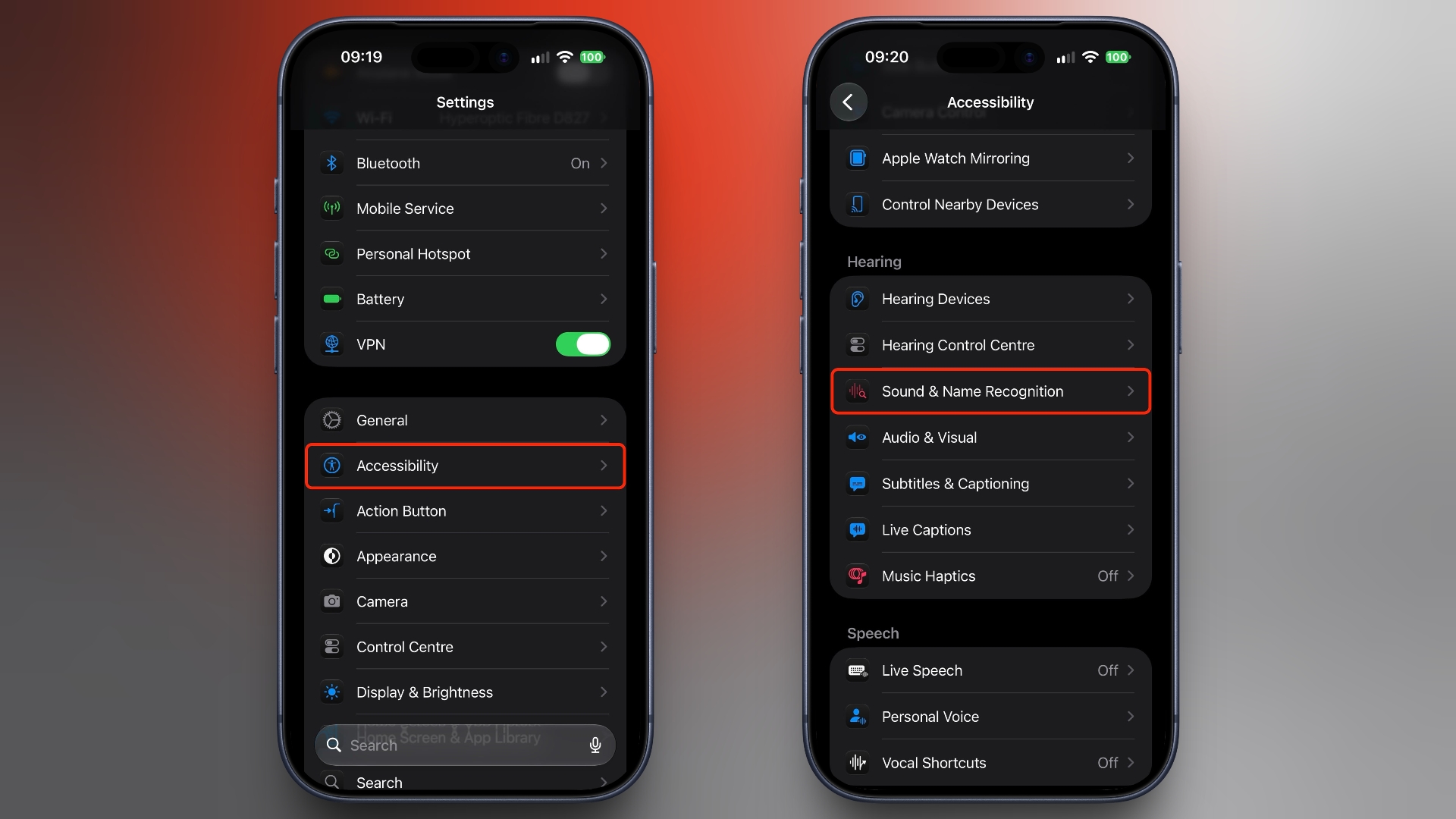
  1. Open the Settings app on your iPhone and tap Accessibility.

  2. In the "Hearing" section, tap Sound & Name Recognition.
    settings
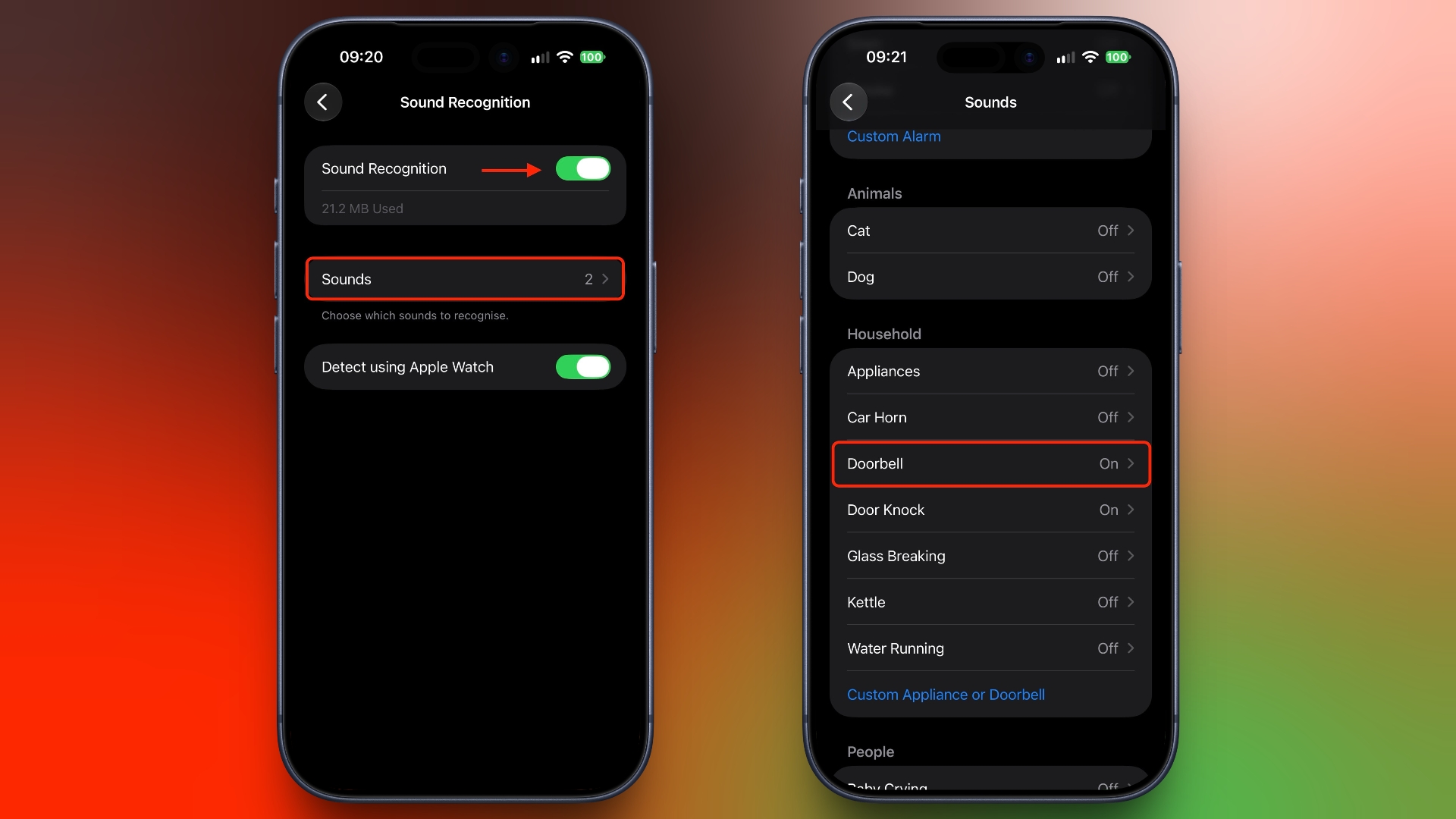
  3. Tap Sound Recognition and turn on the Sound Recognition toggle, then turn on Detect using Apple Watch.
  4. Tap Sounds and turn on the sounds you want to hear about, such as Doorbell. You can also choose a specific alert tone for each sound.
    settings
Apple says Sound Recognition is processed on your Apple Watch and iPhone and doesn't record or store audio. It shouldn't be treated as a safety system, though. You shouldn't rely on it in situations where you may be harmed or injured, in high-risk or emergency situations, or for navigation, per Apple's guidelines.
Related Forum: Apple Watch

This article, "Make Apple Watch Listen for Sounds Like the Doorbell" first appeared on MacRumors.com

Discuss this article in our forums

  •  

Disable Touch on MacBook Pro PROLED XDR and When Using Sidecar

Apple has long rejected the idea of a touchscreen Mac, so moving ahead with one was always going to be a major shift in the company's thinking. In 2010, Steve Jobs argued that "touch surfaces don't want to be vertical," citing the arm fatigue that comes from repeatedly reaching up to a screen.

Some would call this sacrilege...

More than a decade later, in 2021, Apple's then-hardware engineering chief John Ternus remarked that the Mac was made exclusively for indirect input and that Apple saw no compelling reason to change its approach.

"We make the world's best touch computer on an iPad. It's totally optimized for that. And the Mac is totally optimized for indirect input. We haven't really felt a reason to change that," Ternus said in an interview with Joanna Stern.

Touch Comes to the Mac


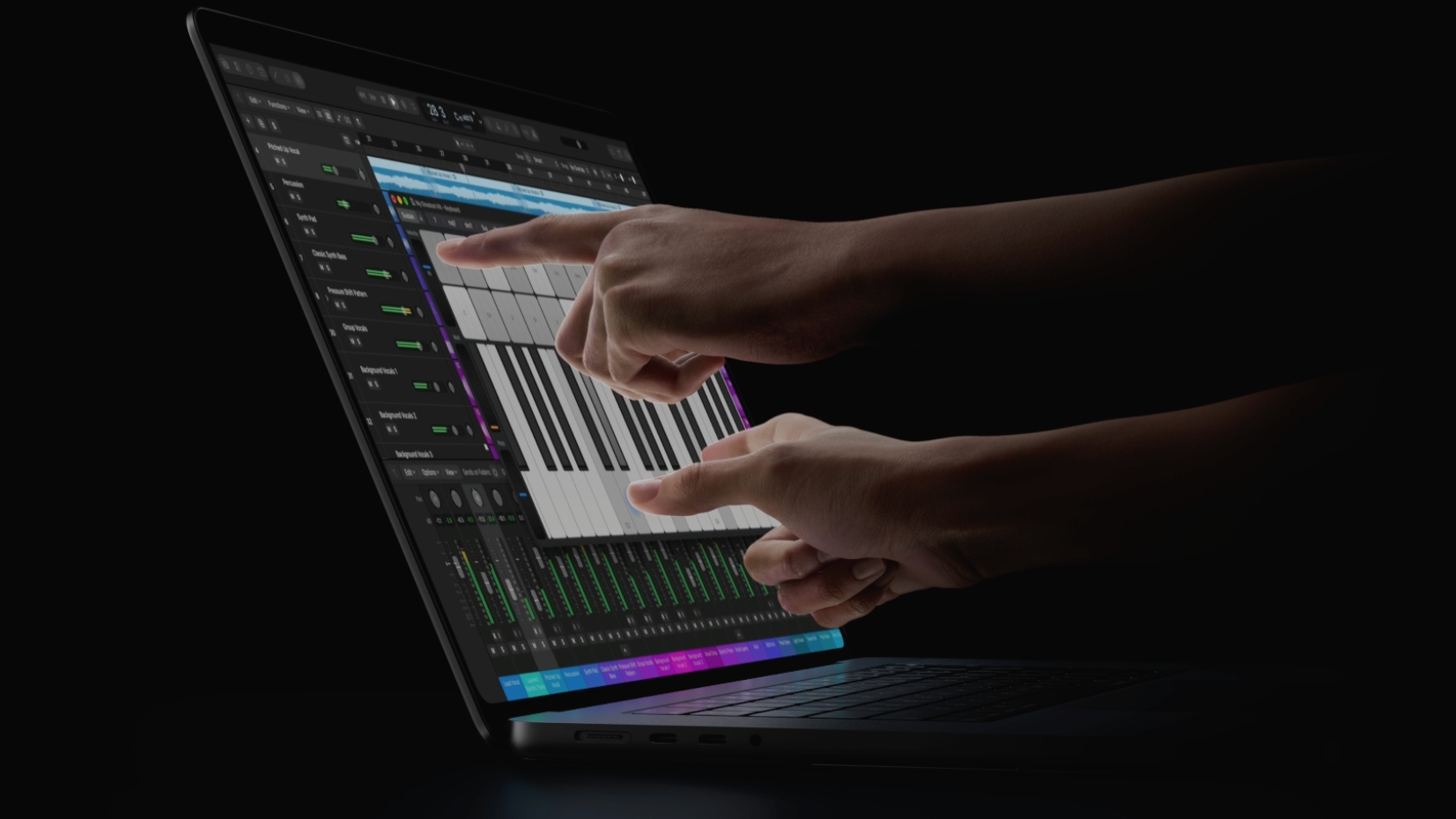
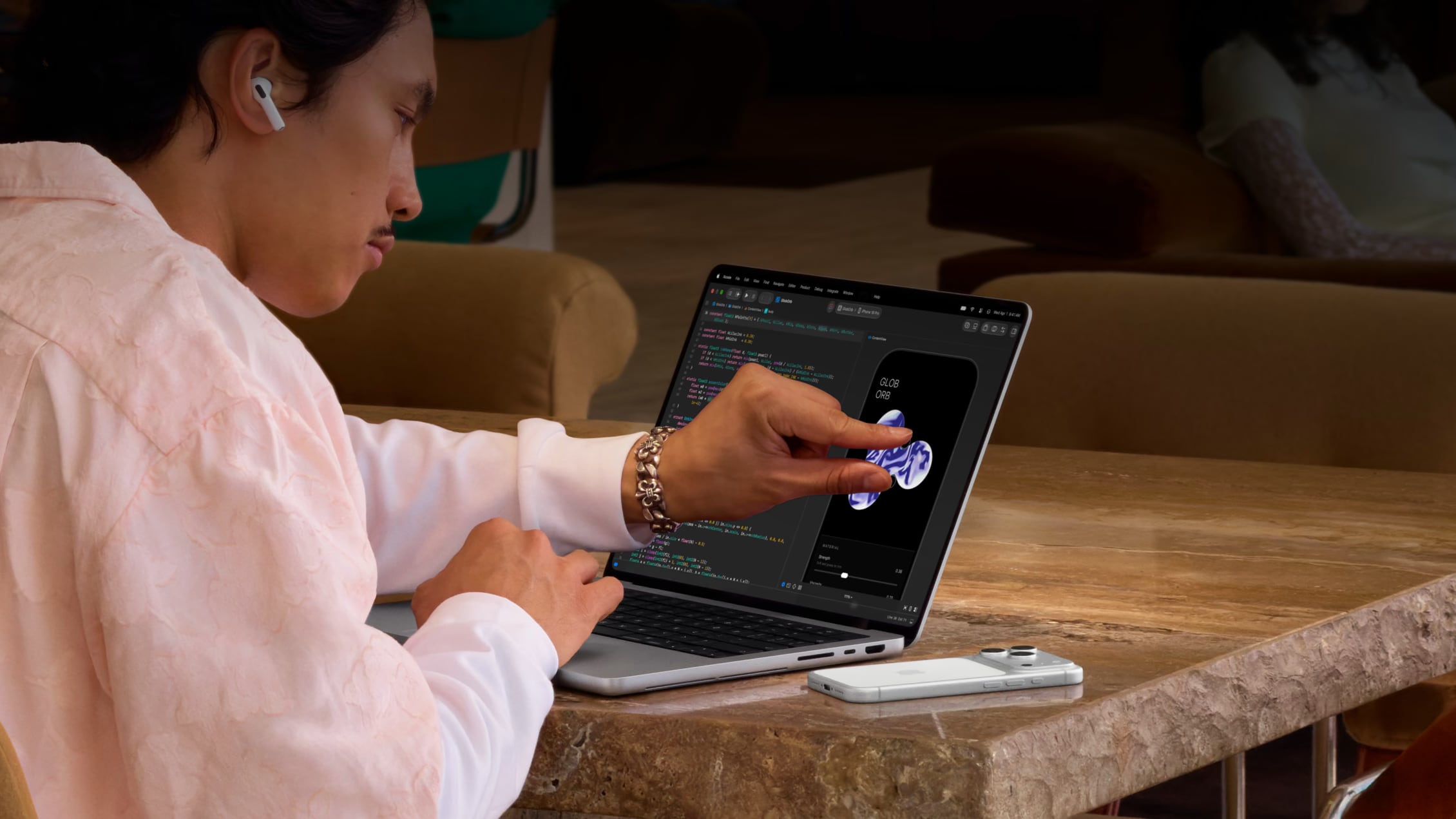
Fast forward to 2026, and Apple has had a change of heart. The new MacBook Pro with PROLED XDR is the first Mac to adopt touchscreen technology. Many younger people who grew up with smartphones and tablets expect to interact with their computers the same way they do with their mobile devices, and that expectation appears to have twisted Apple's arm (no pun intended).

Of course, just because the new MacBook Pro models have a touchscreen doesn't mean you have to use it. If you forget it's even there, you can turn off the function and pretend it doesn't exist. If you use Sidecar with an iPad on another Mac, you can turn off touch in the same way.

Turn Off Touch on MacBook Pro and Sidecar


The steps are the same whether you want to disable the MacBook Pro's touchscreen or touch input in Sidecar:

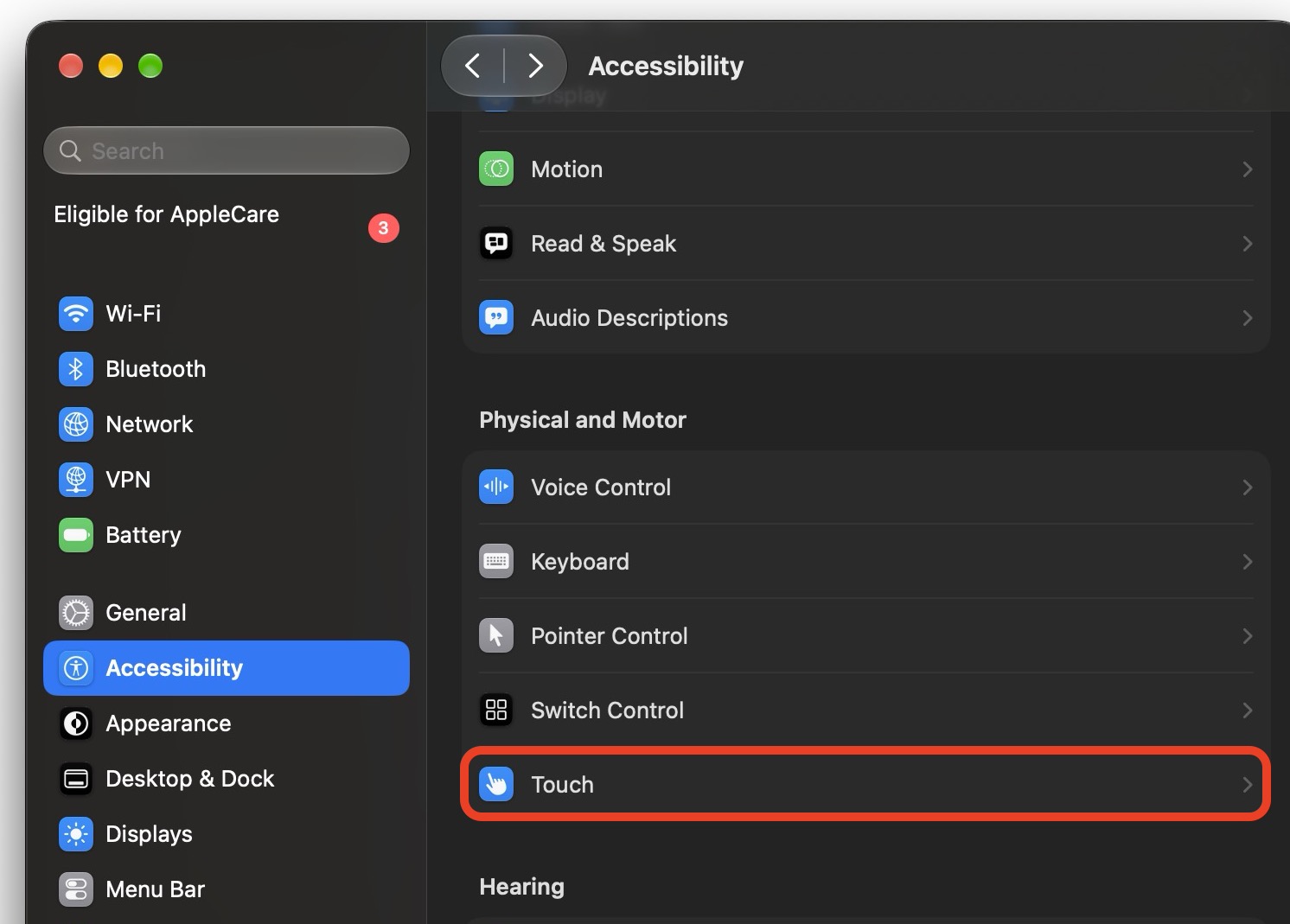
  1. Click the Apple logo in the top-left corner of the menu bar and choose System Settings....

  2. Select Accessibility in the sidebar.

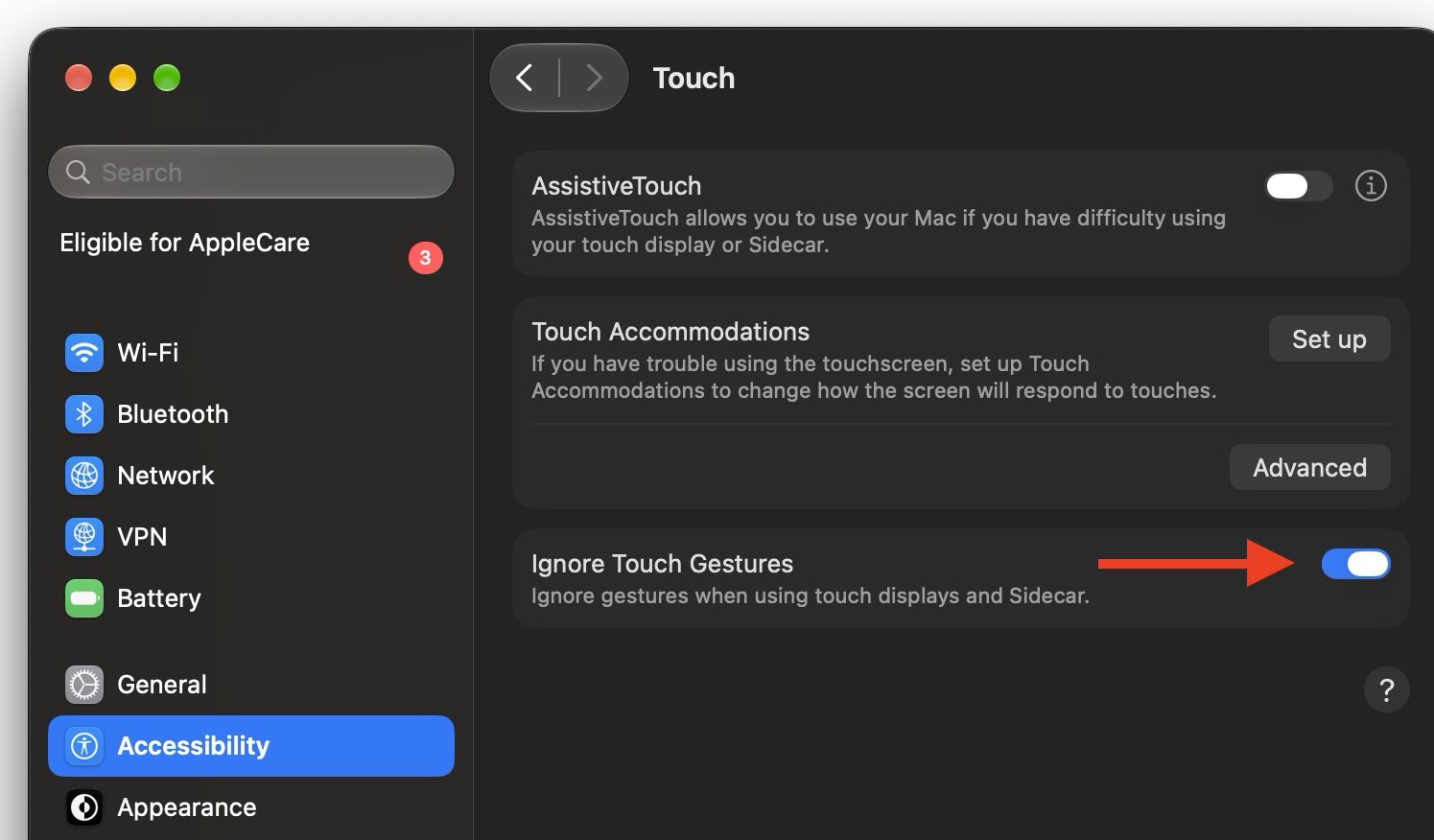
  3. Under "Physical and Motor," click Touch.
    settings
  4. Toggle on the switch next to Ignore Touch Gestures.
    settings
That's all there is to it. Your Mac will now ignore touch input, and since the setting covers Sidecar too, an iPad you use as a second display will ignore touches as well. If you ever want touch back, return to the same screen and toggle off Ignore Touch Gestures.

Touch Friendly, Not Touch First


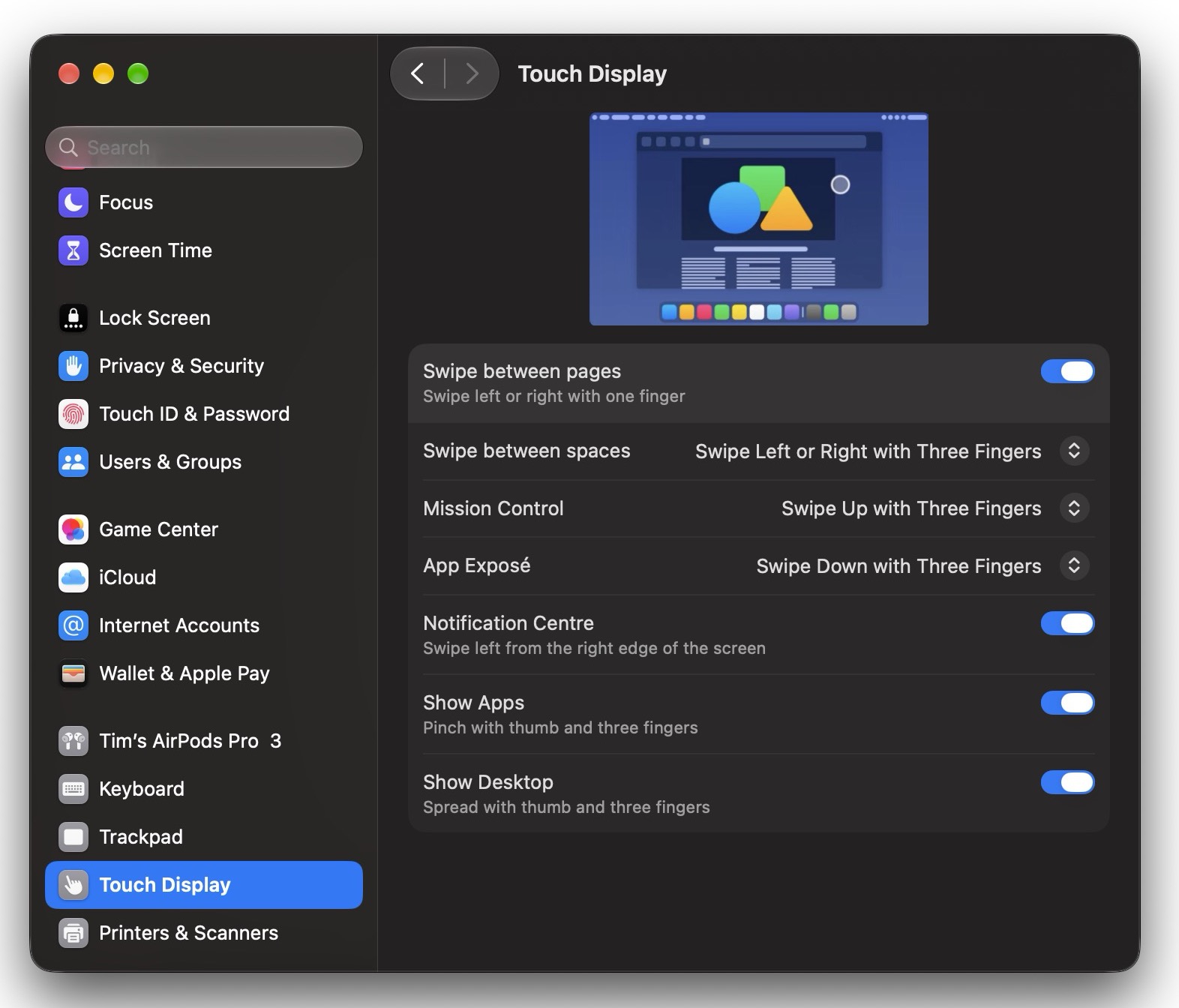
If some gestures prove useful but others keep being triggered by accident, you can adjust them individually instead of disabling touch altogether. In System Settings, select Touch Display in the sidebar, where each gesture can be switched off, and Swipe between spaces, Mission Control, and App Exposé also have pop-up menus for changing how the gesture is performed.

settings
Don't overlook the fact that the Accessibility ➝ Touch screen (where "Ignore Touch Gestures" lives) offers further customization options. Touch Accommodations changes how the screen responds to taps, swipes, and touch-and-hold input. AssistiveTouch can also be found on this settings menu if you want alternative ways to control the screen, and the Accessibility ➝ Zoom menu includes an option to zoom using the touch display or Sidecar.


Whatever you think about touch on a Mac, one group with a genuine reason to leave it on is app developers. Xcode's iOS Simulator responds to direct touch, so you can test your app's taps, swipes, and pinches right on the screen instead of approximating them with a trackpad and keyboard modifiers.
Related Roundup: MacBook Pro
Tag: Sidecar
Buyer's Guide: MacBook Pro (Buy Now)
Related Forum: MacBook Pro

This article, "Disable Touch on MacBook Pro PROLED XDR and When Using Sidecar" first appeared on MacRumors.com

Discuss this article in our forums

  •  

Apple Maps Could Factor Parking Into Your Arrival Time

Apple may be working on a way for Maps arrival estimates that account for parking as well as the walk to your destination, according to findings shared by code explorer pdfu. A new "TimeToPark" flag in the iOS 27.3 beta apparently allows the system to measure time spent near a destination before parking, plus walking time afterwards.
The measurements use background location and motion data, with results saved per trip and grouped by weekday and hour. However, pdfu says the feature can only be enabled on internal installations, and no Maps feature uses the data yet. In other words, watch this space – parking-aware ETAs could yet become a thing.
This article, "Apple Maps Could Factor Parking Into Your Arrival Time" first appeared on MacRumors.com

Discuss this article in our forums

  •  

Waze Now Alerts Drivers to Nearby Cyclists Using Garmin LiveTrack

Waze and Garmin have announced the launch of real-time cycling alerts for drivers to help create a safer environment on the road.

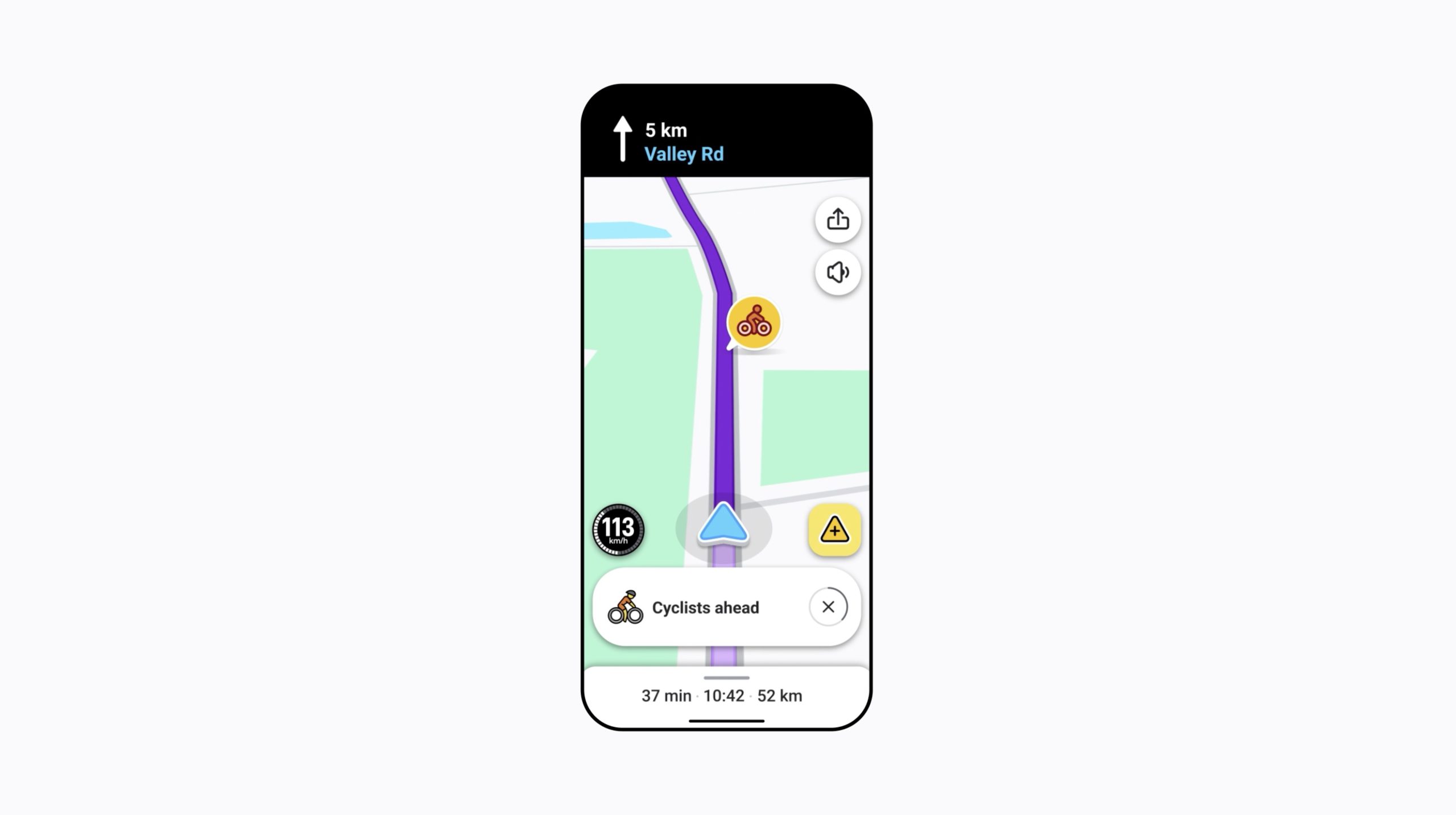
Waze cycling alerts
Going forward, when cyclists turn on Garmin LiveTrack on their Garmin Edge bike computer or Garmin smartwatch, they can choose to show up in Waze as a real-time moving icon.

Drivers will also see a notification when a cyclist is nearby, so they can slow down, stay aware, and share the road.

The feature is completely opt-in, and Waze and Garmin say it is designed with privacy in mind. Drivers only see a temporary alert that a cyclist is nearby, and a cyclist's name, identity, or exact route is never shared in the app. Alerts also automatically turn off the moment a cyclist ends their ride on the Garmin device.

Cycling alerts powered by Garmin LiveTrack are rolling out now globally to Waze on iOS and Android.
Tags: Garmin, Waze

This article, "Waze Now Alerts Drivers to Nearby Cyclists Using Garmin LiveTrack" first appeared on MacRumors.com

Discuss this article in our forums

  •  

iPhone 20 Pro: Ten Big Changes That Could Redefine Apple's Flagship

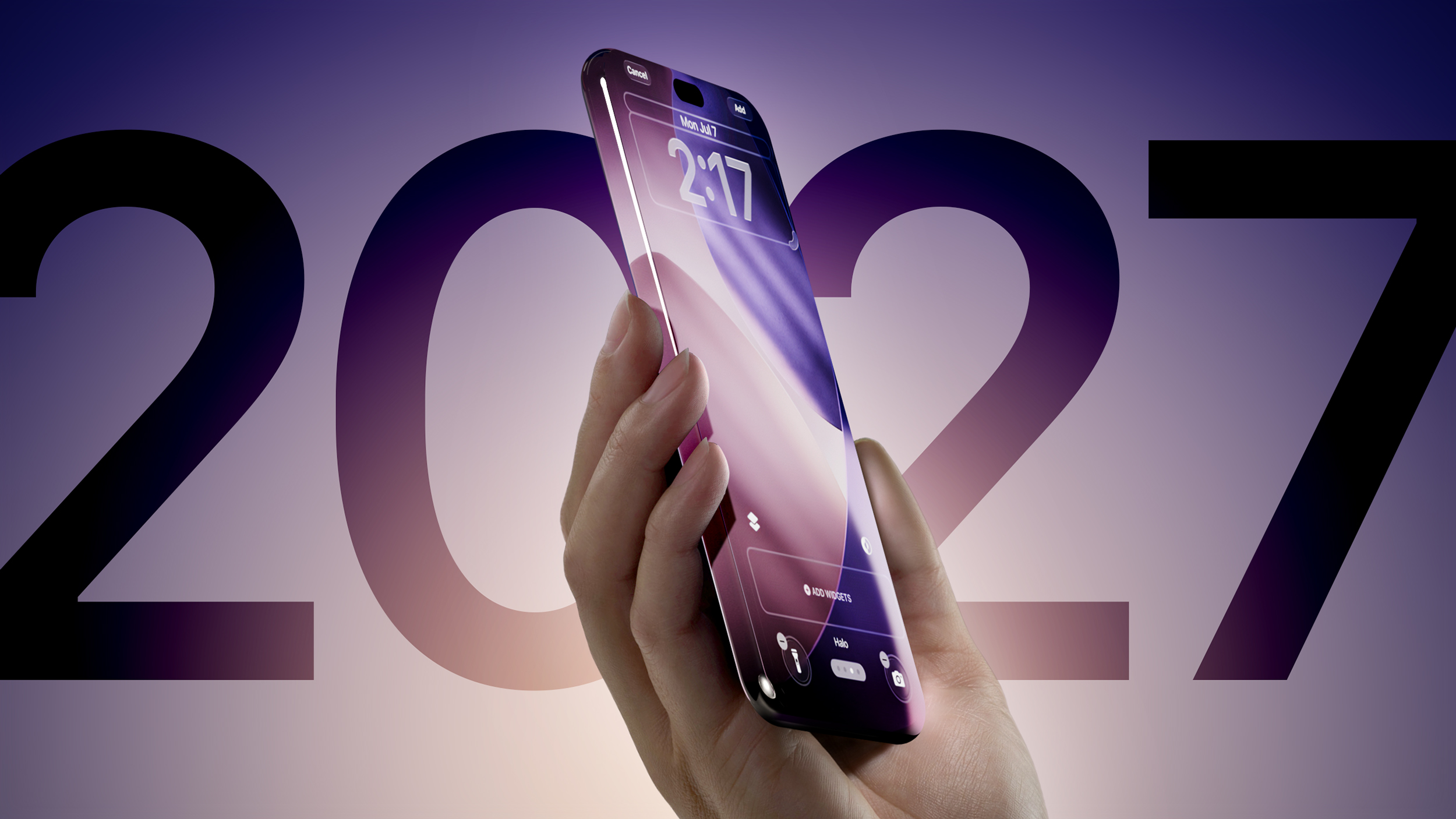
In 2017, Apple celebrated the iPhone's 10th birthday with the iPhone X, the biggest redesign in the product's history. For the device's 20th anniversary, all the rumors indicate that the company is preparing another landmark redesign.


The commemorative "iPhone 20" model isn't expected until September 2027, but leaks have been piling up for months. According to Bloomberg's Mark Gurman, Apple is already deep into its development, and the picture forming across multiple reports is of an iPhone that looks like a single, uninterrupted slab of glass. Here's what we're expecting:

  • A quad-curved, all-glass design: The display glass reportedly curves away on all four sides, concealing the metal frame during normal use. Apple is said to be working with Samsung on an "equal-depth quad-curved" display to achieve the effect.

  • Advanced OLED technology: Apple was reportedly planning a brighter, thinner Samsung OLED panel using Color Filter on Encapsulation (COE) for the anniversary iPhone, but a more recent report suggests the technology has slipped: UBI Research does not expect COE on Apple's Pro iPhones until 2029, casting doubt on its inclusion in the 2027 model.

  • Under-display Face ID and camera: Apple is reportedly continuing to test hardware that would eliminate the final visible cutout from the front of the device. Apple already debuted an under-display camera on the iPhone Duo's inner screen, but reviewers criticized its image quality. Whether an improved version will be ready for the iPhone 20's rumored fall 2027 launch remains uncertain.

  • Solid-state buttons: Apple is said to be testing haptic replacements for the Side, Volume, Action, and Camera Control buttons. The buttons could be integrated directly into the device's frame, with no actual physical movement when pressed, yet retaining a tactile responsiveness.

  • Apple modem in the United States: Apple is developing modems that it hopes will outperform Qualcomm's on speed and AI functionality; its third-generation modem, due in 2027, is the one expected to finally exceed Qualcomm's. The C1 and C1X are used in the iPhone 16e and iPhone Air, and the C2 now powers the iPhone 18 Pro and iPhone Duo. Only the U.S. iPhone 18 Pro Max still uses a Qualcomm modem.

  • Custom Apple image sensor: Apple is said to be developing its own stacked image sensor to replace the Sony sensors it has traditionally used for the iPhone. Apple has reportedly already developed a working prototype. The sensor is said to use LOFIC technology, which would let each pixel store varying amounts of light and potentially reach up to 20 stops of dynamic range.

  • A 2-nanometer A21 chip: The 20th anniversary models are expected to feature a second-generation 2-nanometer chip. Following the A20 Pro in this year's iPhone 18 Pro models, the anniversary models would likely be powered by the A21 Pro.

  • Silicon anode battery: Apple is reportedly exploring a new battery technology that uses a silicon anode capable of storing more lithium ions per gram, potentially delivering longer battery life without increasing the physical size of the battery.

  • Mobile high bandwidth memory: Apple is rumored to be evaluating vertically stacked DRAM technology to improve memory bandwidth and boost on-device AI performance.

  • Two sizes: The two anniversary models are expected to be slightly larger than the iPhone 18 Pro and iPhone 18 Pro Max, with Digital Chat Station claiming 6.41-inch and 6.96-inch displays, the larger of which would likely be marketed as a 7-inch panel.

With all that said, we're still ahead of a rumored fall 2027 launch, and Apple's plans shift constantly behind closed doors, plus features this ambitious have a habit of slipping a year or two. Under-display Face ID in particular has been "two years away" for about five years now.

Still, taken together, the leaks describe the most dramatic iPhone rethink since 2017. If even half of the features make it to the shipped device, the iPhone 20 should be worth holding out for. For everything we know so far, check out our dedicated guide.

This article, "iPhone 20 Pro: Ten Big Changes That Could Redefine Apple's Flagship" first appeared on MacRumors.com

Discuss this article in our forums

  •  
❌