
❌

Normale Ansicht

Second iOS 27.3 and macOS Golden Gate 27.3 Public Betas Now Available

Apple today seeded the second betas of iOS 27.3, iPadOS 27.3, macOS Golden Gate 27.3, tvOS 27.3, and watchOS 27.3. Apple also has revised betas of of iOS 27.3 and iPadOS 27.3 available for developers.

iOS 27.3 is a major update that adds a Vertical Tabs layout option and Adaptive Dark Mode for Safari. Siri AI can do more in and across Apple's apps, and developers are now able to create actions for ‌Siri‌ to carry out.

In the second developer beta, Apple introduced a facial unlock feature for the iPhone Duo that uses the front camera, along with an option to lock the ‌iPhone Duo‌ when it's closed.

The redesigned Health app is now available with custom Insights and Longevity information, and the ‌iPhone Duo‌ supports Reachability. There's a new Selfie Sing feature in Apple Music, plus changes to StandBy on non-Duo iPhones. Apple has started testing Apple Intelligence and ‌Siri‌ AI usage limits, with extra access available through iCloud+ plans. A full list of what's new in the beta can be found in our guide.

On the Apple Watch Series 12 and Ultra 4, Audio Intelligence features Live Rewind and ‌Siri‌ Recap are available for testing. Live Rewind creates a transcript of the last 15 seconds of speech, and ‌Siri‌ Recap offers a high-level summary of conversations throughout the day.

‌macOS Golden Gate‌ 27.3 has the same Safari features, and it brings Live Activities to Macs without a Dynamic Island.

To get the new betas, you can sign up on Apple's beta testing website. After you're signed up, the betas can be installed through the Software Update section in the Settings app on each device.

We're expecting all of Apple's updates to launch in December.
Related Roundups: iOS 27, iPadOS 27, macOS Golden Gate
Related Forums: iOS 27, macOS Golden Gate

This article, "Second iOS 27.3 and macOS Golden Gate 27.3 Public Betas Now Available" first appeared on MacRumors.com

Discuss this article in our forums
  •  

Google's Gemini Can Now Control Apps on Your Mac

Google today expanded Gemini's capabilities, allowing it to take full advantage of your Mac. Gemini for Mac can use apps, files, and websites to complete multi-step tasks in the background while you work in the foreground.


According to Google, Gemini can do repetitive work, handling clicking, typing, menus, and forms. It works in an isolated window with a live preview in the Gemini chat interface so you can keep an eye on what it's doing.

You can choose the apps that Gemini can use, and it will ask for approval before taking "key actions."

Google suggests Gemini's new feature is useful for batch editing photos, preparing listings for resale platforms, and turning metrics and screenshots into a presentation.

The new option for Gemini to take control of a Mac is available before macOS 27.3 launches, so the timing is convenient. With the update, Apple will warn users about the dangers of giving apps unrestricted access to their data, making it clearer exactly what AI agents will be able to see and do.

Apple will let users limit access to specific apps and folders and configure apps to get permission each time access is requested. There's also a transparency indicator that makes it clear when an app is controlling another app.

Users who install apps asking for Mac permissions now won't have to re-grant those permissions after macOS 27.3 is released, nor will users see the new explanation screens Apple is putting in place.

Gemini for Mac can be downloaded from the Google website. Computer use is available to Google AI Plus, Pro, and Ultra subscribers in the U.S., with the plans starting at $4.99 per month. The app requires an Apple silicon Mac.
Tags: Gemini, Google

This article, "Google's Gemini Can Now Control Apps on Your Mac" first appeared on MacRumors.com

Discuss this article in our forums
  •  

iPhone Duo vs. Samsung Galaxy Z Fold8: Which is Better?

A couple of months before the iPhone Duo came out, Samsung launched the Galaxy Z Fold8. It's Samsung's widest and shortest foldable to date, with Samsung adopting an aspect ratio closer to the ‌iPhone Duo‌'s than its previous foldable smartphones. Since the Z Fold8 was clearly designed to compete with the ‌iPhone Duo‌, we thought we'd compare the two devices.


The Galaxy Z Fold8 and ‌iPhone Duo‌ are similar in size, but the Fold8 is noticeably lighter. It's about 50 grams lighter than the ‌iPhone Duo‌, and it makes a difference when you're holding it. It's lighter because it's thinner than the ‌iPhone Duo‌ when folded and unfolded. The Z Fold8 is 6mm taller and around 3mm narrower, though both have a 7.6-inch inner display.

The ‌iPhone Duo‌ has a heftier feel and a more premium build, plus it has rounded corners that feel nicer in the hand than the Z Fold8's sharper, rectangular corners.

Apple used a matte nano-texture display for the ‌iPhone Duo‌, and that's likely something we're going to see Android smartphone makers imitate in their future foldables. The matte display goes a long way toward minimizing the visibility of the crease. Apple also put the camera on the inner display under the screen, which is something Samsung experimented with in earlier models and then abandoned.

Under-display front cameras are generally lower resolution than standard cameras, and there have been complaints about the quality of the ‌iPhone Duo‌'s inner front camera. The Z Fold8 has a more traditional hole-punch camera that's better quality.

Both smartphones use fingerprint recognition rather than facial recognition, but Samsung has long offered a face unlock feature that uses the front-facing camera. Apple just this week adopted a similar face unlock option, and it's coming in iOS 27.3. Face unlock is less secure than the Face ID system used for Apple's other iPhones, but it is more convenient than Touch ID for some users.

Neither smartphone has a telephoto camera, so both Apple and Samsung compromised on camera quality. The ‌iPhone Duo‌ has a 48-megapixel Main camera and a 48-megapixel Ultra Wide, while the Z Fold8 has 50-megapixel wide and ultra wide cameras. The main difference in image quality is the computational processing each smartphone offers, so which one is "better" comes down to your preference for white balance, saturation, tone, and similar factors.

The Z Fold8 supports 8K video recording and reverse wireless charging for accessories, plus it has a physical SIM while the Duo only has an eSIM. Samsung's smartphone is limited to IP48 dust and water resistance, while the ‌iPhone Duo‌ has IP68. Samsung uses the Qualcomm Snapdragon 8 Elite Gen 5, and the ‌iPhone Duo‌ has Apple's A20 Pro chip. The other big difference is stylus support. The ‌iPhone Duo‌ works with the USB-C Apple Pencil, but the Z Fold8 doesn't work with Samsung's S Pen options.

Since Samsung has been making foldable smartphones for years, developers have had more time to update their apps for the form factor. Most Android apps already work well, while we're still waiting for many developers to update their apps for the Duo. Samsung is also ahead on multitasking, with the option to use three apps at once and support for pop-up windows and a taskbar.

Samsung's Galaxy Z Fold8 is slightly cheaper than the ‌iPhone Duo‌, with pricing starting at $1,899.99 while the Duo starts at $1,999, but deciding between them will come down to your operating system preference and device ecosystem. If you're accustomed to iOS and have an Apple Watch, Mac, and other Apple devices, there's little reason to choose a Samsung smartphone. The same goes for Samsung users who have other Galaxy devices.

Do you prefer the ‌iPhone Duo‌ or the Galaxy Z Fold8? Let us know in the comments below.
Related Roundup: iPhone Duo
Tag: Samsung
Buyer's Guide: iPhone Duo (Buy Now)
Related Forum: iPhone

This article, "iPhone Duo vs. Samsung Galaxy Z Fold8: Which is Better?" first appeared on MacRumors.com

Discuss this article in our forums
  •  

Instagram Now Lets You Save Songs to Apple Music

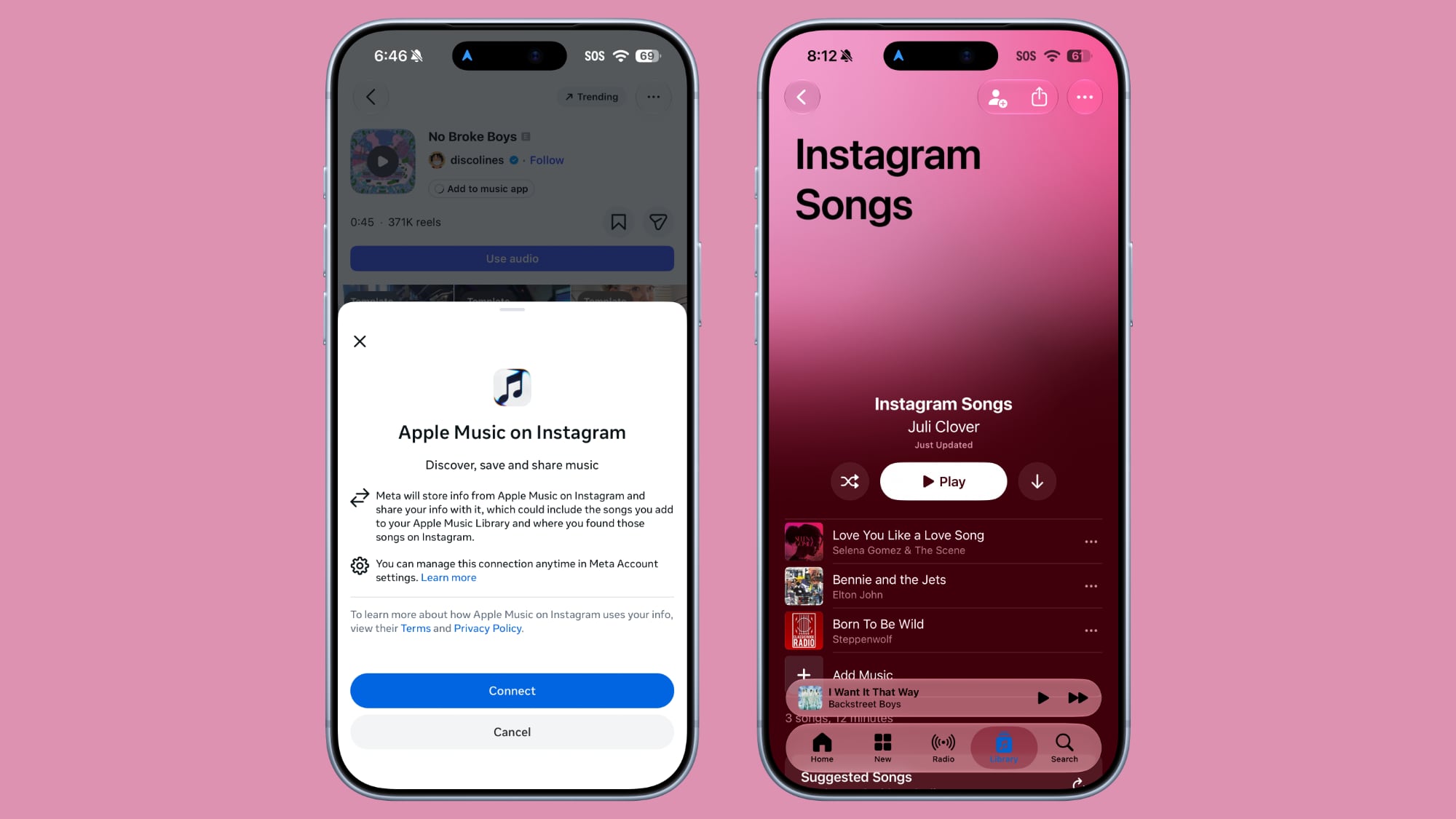
Sometime in the last week or two, Instagram added a new Apple Music feature. You can now connect an ‌Apple Music‌ account to the social network and save songs you come across to an ‌Apple Music‌ playlist.


If you tap a song link on a post or a story on Instagram, you'll see a prompt to connect Instagram to ‌Apple Music‌. Once your ‌Apple Music‌ account is linked to Instagram, you can tap a song name in a post and use the "Add to ‌Apple Music‌" button to save it.

Songs are saved in an "Instagram Songs" playlist in the Library section of the Music app.

Instagram previously supported sharing ‌Apple Music‌ songs in Stories and direct messages, but there was no option for saving content from Instagram to ‌Apple Music‌. Spotify also supports saving songs from Instagram to the Liked Songs section on the streaming service.
This article, "Instagram Now Lets You Save Songs to Apple Music" first appeared on MacRumors.com

Discuss this article in our forums

  •  

Apple Releases Safari Technology Preview 257 With Bug Fixes and Performance Improvements

Apple today released a new update for Safari Technology Preview, the experimental browser that was first introduced in March 2016. Apple designed ‌Safari Technology Preview‌ to allow users to test features that are planned for future release versions of the Safari browser.


‌Safari Technology Preview‌ 257 includes fixes and updates for Animations, CSS, Canvas, Editing, Forms, Images, JavaScript, Media, Networking, Performance, Rendering, SVG, Scrolling, Security. Web API, Web Extensions, Web Inspector, WebAssembly, Web Driver, WebGL, WebGPU, and WebRTC.

The current ‌Safari Technology Preview‌ release is compatible with machines running macOS Tahoe and macOS Golden Gate, the newest version of macOS.

The ‌Safari Technology Preview‌ update is available through the Software Update mechanism in System Preferences or System Settings to anyone who has downloaded the browser from Apple's website. Complete release notes for the update are available on the Safari Technology Preview website.

Apple's aim with ‌Safari Technology Preview‌ is to gather feedback from developers and users on its browser development process. ‌Safari Technology Preview‌ can run side-by-side with the existing Safari browser and while it is designed for developers, it does not require a developer account to download and use.
This article, "Apple Releases Safari Technology Preview 257 With Bug Fixes and Performance Improvements" first appeared on MacRumors.com

Discuss this article in our forums

  •  
❌